
MCA Microsoft Security Operations Analyst · SC-200
Pass the Microsoft Security Operations Analyst Certification in Just 4 Days
Live instructor-led training, official courseware, hands-on labs, exam voucher, and a free retake — all in one package.
What's Included
Microsoft Certified Trainer (MCT) Instructor Led Live Training
1 Microsoft Official Courses (SC-200)
1 Microsoft Test Vouchers (SC-200)
Free Retake Voucher for Each Exam
Microsoft Vetted Practice Exams
Microsoft Official Hands on Labs
Onsite & Online Pearson Vue Testing
Upcoming Sessions
MCA Microsoft Security Operations Analyst (SC-200) Boot Camp
Scroll to see additional dates.
Date
Location / Format
Price
PRIVATE – 1-ON-1
Ft Lauderdale, FL / Virtual
$3,495.00
Nov 30 – Dec 3, 2026
Ft Lauderdale, FL · Onsite
$2,795.00
Nov 30 – Dec 3, 2026
Virtual 9am EST Start
$2,795.00
Dec 14–17, 2026
Ft Lauderdale, FL · Onsite
$2,795.00
Dec 14–17, 2026
Virtual 9am EST Start
$2,795.00
Jan 11–14, 2027
Ft Lauderdale, FL · Onsite
$2,795.00
Jan 11–14, 2027
Virtual 9am EST Start
$2,795.00
Feb 1–4, 2027
Ft Lauderdale, FL · Onsite
$2,795.00
Feb 1–4, 2027
Virtual 9am EST Start,
$2,795.00
Feb 22–25, 2027
Ft Lauderdale, FL, · Onsite
$2,795.00
Feb 22–25, 2027
Virtual 9am EST Start
$2,795.00
Training a Team? Get a Customized Team Quote
Volume pricing available for groups and corporate training.
Upcoming Sessions
MCA Microsoft Security Operations Analyst
Course Details
MCA Microsoft Security Operations Analyst (SC-200) Boot Camp
Duration
4 Days
Exams Covered
SC-200
Delivery
Classroom Live
Remote Live
Included
Vouchers + Retake + Official Labs
Why Thousands Choose Career Camps
17+ Years of Training Experience
For more than 17 years, professionals and organizations have relied on our training expertise to build in-demand technology skills, prepare for industry certifications, and advance their teams.
5,000+ Professionals Trained
With 5,000+ professionals trained, we bring extensive experience supporting individuals, enterprise teams, government organizations, and military clients with technology skills and certification training.
Trusted by Professionals & Organizations
Trusted by thousands of IT professionals, businesses, government organizations, and enterprise teams for high-quality certification training and technology skills development.
Access to 10+ Training Providers
Get access to training from 10+ established certification training providers, giving you more options to find the right course, schedule, delivery format, and training solution for your certification goals.
Live Certified Instructors
Learn directly from experienced certified instructors—not prerecorded videos or self-paced material.
Official Training
Train with authorized, official courseware and curriculum from leading technology certification providers. Get the same industry-recognized training designed to prepare professionals for today’s most in-demand certifications and technology roles.
Course Description
Description
Prerequisites
Before attending this course, students should have:
• A basic understanding of Microsoft security technologies
• Familiarity with networking concepts and operating systems
• Knowledge of cloud computing concepts
• Experience with security operations concepts such as monitoring, investigation, and incident response
Why Choose Us
CAREER CAMPS DIFFERENCE
Career Camps provides an in-depth hands on learning environment. Our instructors teach using demonstrations and explain concepts beyond the scope of the courseware. The best instructors are contracted from all across the US. These professionals are real world consultants who actually implement these technologies. Career Camps knows our clients work in the “real world” and it only makes sense to have an instructor with the experience in the real world.
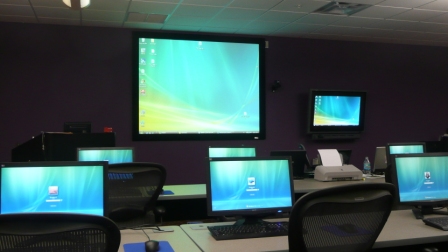 Facilities – Many of our competitors over-crowd classrooms by placing 2 to 3 students per desk and 20+ students per instructor. Often these companies “extend” the life of very old equipment with slow performance on the software used today. Our average class size is 8 students. Our facilities have the best equipment with the most comfortable, focused environment for learning.
Instructors – Our CEO holds one of the rarest Microsoft Certifications – the Microsoft Certified Learning Consultant (MCLC) Certification. This certification reflects a commitment to make sure our instructors are also actively engaged in real world consulting projects. Students expect a professional who can answer questions and demonstrate the technology.
Face to Face Training – We believe the best way to interact and learn is face to face training. Many of our competitors which offer local training are simply providing students with headphones/mic to attend class with an instructor at a remote location.
Test Pass – We offer a free retake voucher (if needed) for each of the exams required for certification. Any training center offering a “100% pass guarantee” would have to use unethical practices or unlimited test vouchers (which is not likely or practical).
Distractions – Students often look for a “local” training center so they can be close to home and work. Boot camp requires a tremendous time commitment during the program. Long class hours combined with self study each evening. The goal of boot camp is to achieve certification in a fraction of the time. We strongly recommend students attend camp away from home and work in a focused, distraction free environment.
Boot Camp – Boot camp is an accelerated training focused on teaching technology and testing students on the official exams. Most training providers “added” boot camps to the existing standard training classes they offer. These training centers think a boot camp is just a regular class where you send the student home with a voucher on the last day. Career Camps administers exams throughout the camp. Equally important – not every trainer can teach a boot camp and not all courseware is designed for boot camp format. Our trainers know the boot camp format and our courseware is designed for accelerated learning.
Florida – Career Camps has one of the most scenic locations boasting some of the best weather in US. We believe students should have a comfortable and inviting atmosphere while attending these otherwise intense programs. We place our location, facilities and amenities up against that any competitor.
Microsoft Gold Learning Partner

What You'll Learn
You Will Learn How To
After completing this course, you will be able to:
- Mitigate threats using Microsoft Defender XDR
- Investigate and remediate incidents across Microsoft security solutions
- Use Microsoft Security Copilot to support security operations workflows
- Investigate data security and insider risk activities using Microsoft Purview
- Protect and investigate endpoints using Microsoft Defender for Endpoint
- Secure cloud workloads using Microsoft Defender for Cloud
- Create and optimize Kusto Query Language (KQL) queries for Microsoft Sentinel
- Configure and manage Microsoft Sentinel environments
- Connect data sources and security logs to Microsoft Sentinel
- Create detections, automate response actions, and investigate incidents
- Perform proactive threat hunting using Microsoft Sentinel
- Analyze security alerts, evidence, and threat intelligence to identify malicious activity
Course Outline
Mitigate Threats Using Microsoft Defender XDR
- Introduction to Microsoft Defender XDR threat protection
- Mitigate incidents using Microsoft Defender
- Remediate threats using Microsoft Defender
- Manage Microsoft Entra Identity Protection
- Safeguard your environment with Microsoft Defender for Identity
- Secure your cloud apps and services with Microsoft Defender for Cloud Apps
Mitigate Threats Using Microsoft Security Copilot
- Introduction to generative AI and agents
- Describe Microsoft Security Copilot
- Describe the core features of Microsoft Security Copilot
- Describe the embedded experiences of Microsoft Security Copilot
- Experience Security Copilot through guided simulations
Mitigate Threats Using Microsoft Purview
- Investigate and respond to Microsoft Purview Data Loss Prevention alerts
- Investigate insider risk alerts and related activity
- Search and investigate with Microsoft Purview Audit
- Search for content with Microsoft Purview eDiscovery
Mitigate Threats Using Microsoft Defender for Endpoint
- Protect against threats with Microsoft Defender for Endpoint
- Deploy the Microsoft Defender for Endpoint environment
- Implement Windows security enhancements
- Perform device investigations
- Perform device response actions
- Investigate evidence and entities
- Configure and manage automation
- Configure alerts and detections
- Utilize Vulnerability Management
Mitigate Threats Using Microsoft Defender for Cloud
- Plan cloud workload protections
- Connect Azure resources
- Connect non-Azure resources
- Manage cloud security posture
- Understand workload protection capabilities
- Remediate security alerts
Create Queries for Microsoft Sentinel Using Kusto Query Language
- Construct KQL statements
- Analyze query results
- Build multi-table queries
- Work with Microsoft Sentinel data using KQL
Configure Your Microsoft Sentinel Environment
- Introduction to Microsoft Sentinel
- Create and manage Sentinel workspaces
- Query logs in Microsoft Sentinel
- Use watchlists
- Utilize threat intelligence
- Integrate Microsoft Defender XDR with Microsoft Sentinel
Connect Logs to Microsoft Sentinel
- Connect data using data connectors
- Connect Microsoft services
- Connect Microsoft Defender XDR
- Connect Windows hosts
- Connect Common Event Format (CEF) logs
- Connect Syslog data sources
- Connect threat intelligence indicators
Create Detections and Perform Investigations Using Microsoft Sentinel
- Threat detection with analytics rules
- Automation in Microsoft Sentinel
- Threat response with playbooks
- Security incident management
- Behavioral analytics
- Data normalization
- Query, visualize, and monitor data
- Manage Microsoft Sentinel content
Perform Threat Hunting in Microsoft Sentinel
- Explain threat hunting concepts
- Threat hunting with Microsoft Sentinel
- Use Search Jobs
- Hunt for threats using notebooks
Frequently Asked Questions
Who should attend an SC-200 Boot Camp?
The SC-200 Boot Camp is designed for security operations analysts, cybersecurity analysts, threat hunters, incident responders, security administrators, and IT professionals responsible for detecting, investigating, and responding to cybersecurity threats using Microsoft security technologies.
What will I learn in the SC-200 Boot Camp?
Students learn how to investigate and respond to security incidents, analyze security data, create threat detections, perform threat hunting, automate response actions, and use Microsoft's security operations tools across cloud and hybrid environments.
Does the SC-200 Boot Camp include hands-on training?
Yes. Hands-on exercises help students develop practical experience using Microsoft security technologies to analyze security events, investigate incidents, identify threats, create detections, and perform security operations tasks.
Do I need cybersecurity experience before taking the SC-200 Boot Camp?
Some experience with cybersecurity, Microsoft technologies, cloud environments, or IT administration can be helpful. However, the SC-200 Boot Camp provides structured instruction on the Microsoft security tools and concepts covered by the course.
What is the difference between SC-200 and SC-100?
SC-200 focuses on security operations, including threat detection, investigation, response, and threat hunting. SC-100 focuses on cybersecurity architecture and security solution design. SC-200 is generally more focused on the day-to-day responsibilities of a security operations analyst.
Related products
-
ISC2 CISSP Certification Boot Camp
$4,395.00 Course Details This product has multiple variants. The options may be chosen on the product page -
ISC2 Official CCSP Certification Boot Camp
$3,795.00 Course Details This product has multiple variants. The options may be chosen on the product page -

Microsoft Cloud and AI Security Engineer Associate Certification (SC-900, SC-500) Boot Camp
Price range: $3,695.00 through $4,395.00 Course Details This product has multiple variants. The options may be chosen on the product page
Ready to Take the Next Step?
Choose your upcoming training date or talk with our training advisors about the right option for you or your team.