
MCA Microsoft Fabric Analytics Engineer & MCA Microsoft Fabric Data Engineer Associate Certification (DP-600, DP-700) Boot Camp
The NEW 6-Day Boot Camp for MCA Microsoft Certified: Fabric Analytics Engineer Associate and Fabric Data Engineer Associate prepares students to utilize Fabric dataflows, pipelines, and notebooks to create advanced analytics solutions,…
What's Included
Microsoft Certified Trainer (MCT) Instructor Led Live Training
2 Microsoft Official Courses (DP-600 / DP-700)
2 Microsoft Official Exam Vouchers (DP-600 / DP-700)
2 Retake Vouchers (1 per exam, if needed)
Microsoft Official Hands on Labs
Microsoft Vetted Practice Exams
Onsite & Online Pearson Vue Testing
Skills Gained:
Get started with Microsoft Fabric
Implement a data warehouse with Microsoft Fabric
Work with semantic models in Microsoft Fabric
Administer and govern Microsoft Fabric
Ingest data with Microsoft Fabric
Implement a Lakehouse with Microsoft Fabric
Implement Real-Time Intelligence with Microsoft Fabric
Implement a data warehouse with Microsoft Fabric
Manage a Microsoft Fabric environment
Upcoming Sessions
MCA Microsoft Fabric Analytics Engineer & MCA Microsoft Fabric Data Engineer Associate Certification (DP-600, DP-700) Boot Camp
Scroll to see additional dates.
Date
Location / Format
Price
· Onsite
$4,995.00
· Onsite
$4,995.00
· Onsite
$4,995.00
· Onsite
$4,995.00
· Onsite
$4,995.00
Training a team? Get a customized Team Quote
Volume pricing available for groups and corporate training.
Why Thousands Choose Career Camps
17+ Years of Training Experience
More than 17 years helping IT professionals and organizations achieve their certification goals.
5,000+ Professionals Trained
Training experience spanning individual professionals, enterprise organizations, government and military clients.
Trusted by Professionals & Organizations
Training delivered to thousands of IT professionals and organizations, including enterprise environments.
Access to 10+ Training Providers
Career Camps gives you access to certification training from multiple established training providers.
Live Certified Instructors
Learn directly from experienced instructors—not prerecorded videos or self-paced material.
Training That Fits Your Team
Whether you're advancing your own career or training an entire team, we can help you find the right solution.
Course Description
Description
Why Choose Us
CAREER CAMPS DIFFERENCE
Career Camps provides an in-depth hands on learning environment. Our instructors teach using demonstrations and explain concepts beyond the scope of the courseware. The best instructors are contracted from all across the US. These professionals are real world consultants who actually implement these technologies. Career Camps knows our clients work in the “real world” and it only makes sense to have an instructor with the experience in the real world.
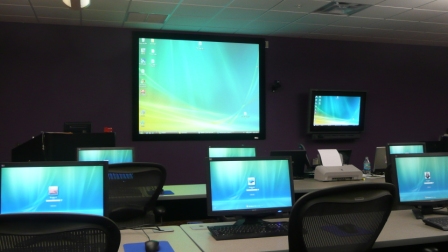 Facilities – Many of our competitors over-crowd classrooms by placing 2 to 3 students per desk and 20+ students per instructor. Often these companies “extend” the life of very old equipment with slow performance on the software used today. Our average class size is 8 students. Our facilities have the best equipment with the most comfortable, focused environment for learning.
Instructors – Our CEO, Chester Flake holds one of the rarest Microsoft Certifications – the Microsoft Certified Learning Consultant (MCLC) Certification. This certification reflects a commitment to make sure our instructors are also actively engaged in real world consulting projects. Students expect a professional who can answer questions and demonstrate the technology.
Face to Face Training – We believe the best way to interact and learn is face to face training. Many of our competitors which offer local training are simply providing students with headphones/mic to attend class with an instructor at a remote location.
Test Pass – We offer a free retake voucher (if needed) for each of the exams required for certification. Any training center offering a “100% pass guarantee” would have to use unethical practices or unlimited test vouchers (which is not likely or practical).
Distractions – Students often look for a “local” training center so they can be close to home and work. Boot camp requires a tremendous time commitment during the program. Long class hours combined with self study each evening. The goal of boot camp is to achieve certification in a fraction of the time. We strongly recommend students attend camp away from home and work in a focused, distraction free environment.
Boot Camp – Boot camp is an accelerated training focused on teaching technology and testing students on the official exams. Most training providers “added” boot camps to the existing standard training classes they offer. These training centers think a boot camp is just a regular class where you send the student home with a voucher on the last day. Career Camps administers exams throughout the camp. Equally important – not every trainer can teach a boot camp and not all courseware is designed for boot camp format. Our trainers know the boot camp format and our courseware is designed for accelerated learning.
Florida – Career Camps has one of the most scenic locations boasting some of the best weather in US. We believe students should have a comfortable and inviting atmosphere while attending these otherwise intense programs. We place our location, facilities and amenities up against that any competitor.
Microsoft Gold Learning Partner
Career Camps has developed a comprehensive training / delivery format focused on learning beyond the generic book content (accessible to any Microsoft training provider). Our program incorporates interactive demonstrations and detailed real world explanations. When possible – additional content, videos, labs & demonstrations are provided to expand on advanced topics – providing additional insight and perspective. Career Camps training is not the typical book & PowerPoint presentation found at any local training center.
As a Microsoft Certified Partner with Gold Learning Competency – we adhere to the strict guidelines, standards and requirements to use Microsoft’s exclusive curriculum. More over – our standards go beyond the “minimum requirements” set forth by Microsoft Learning.
We leverage our partnership benefits of courseware customization to build end to end technology training solutions. Students gain practical skills which can be implemented immediately.
At most training centers – learning starts on the first day of class and ends on the last day. Our boot camp training program is designed to offer resources before, during and after the training.
Course Outline
Topics Covered in this Official Boot Camp:
- Introduction to end-to-end analytics using Microsoft Fabric
- Explore end-to-end analytics with Microsoft Fabric
- Explore data teams and Microsoft Fabric
- Enable and use Microsoft Fabric
- Get started with lakehouses in Microsoft Fabric
- Explore the Microsoft Fabric lakehouse
- Work with Microsoft Fabric lakehouses
- Explore and transform data in a lakehouse
- Use Apached Spark in Microsoft Fabric
- Prepare to use Apache Spark
- Run Spark code
- Work with data in a Spark dataframe
- Work with data using Spark SQL
- Visualize data in a Spark notebook
- Work with Delta Lake tables in Microsoft Fabric
- Understand Delta Lake
- Create delta tables
- Optimize delta tables
- Work with delta tables in Spark
- Use delta tables with streaming data
- Orchestrate processes and data movement with Microsoft Fabric
- Understand pipelines
- Use the Copy Data activity
- Use pipeline templates
- Run and monitor pipelines
- Ingest Data with Dataflows Gen2 in Microsoft Fabric
- Understand Dataflows Gen2 in Microsoft Fabric
- Explore Dataflows Gen2 in Microsoft Fabric
- Integrate Dataflows Gen2 and Pipelines in Microsoft Fabric
- Get started with data warehouses in Microsoft Fabric
- Understand data warehouse fundamentals
- Understand data warehouses in Fabric
- Query and transform data
- Prepare data for analysis and reporting
- Secure and monitor your data warehouse
- Get started with Real-Time Intelligence in Microsoft Fabric
- What is real-time data analytics?
- Real-Time Intelligence in Microsoft Fabric
- Ingest and transform real-time data
- Store and query real-time data
- Visualize real-time data
- Automate actions
- Get started with data science in Microsoft Fabric
- Understand the data science process
- Explore and process data with Microsoft Fabric
- Train and score models with Microsoft Fabric
- Administer a Microsoft Fabric Environment
- Understand the Fabric Architecture
- Understand the Fabric administrator role
- Manage Fabric security
- Govern data in Fabric
- Introduction to end-to-end analytics using Microsoft Fabric
- Explore end-to-end analytics with Microsoft Fabric
- Explore data teams and Microsoft Fabric
- Enable and use Microsoft Fabric
- Get started with data warehouses in Microsoft Fabric
- Understand data warehouse fundamentals
- Understand data warehouses in Fabric
- Query and transform data
- Prepare data for analysis and reporting
- Secure and monitor your data warehouse
- Load data into a Microsoft Fabric data warehouse
- Explore data load strategies
- Use data pipelines to load a warehouse
- Load data using T-SQL
- Load and transform data with Dataflow Gen2
- Query a data warehouse in Microsoft Fabric
- Query data
- Use the SQL query editor
- Explore the visual query editor
- Use client tools to query a warehouse
- Monitor a Microsoft Fabric data warehouse
- Monitor capacity metrics
- Monitor current activity
- Monitor queries
- Secure a Microsoft Fabric data warehouse
- Explore dynamic data masking
- Implement row-level security
- Implement column-level security
- Configure SQL granular permissions using T-SQL
- Add measures to Power BI Desktop models
- Create simple measures
- Create compound measures
- Create quick measures
- Compare calculated columns with measures
- Design scalable semantic models
- Choose the best storage mode
- Configure semantic models for large data
- Work with relationships
- Write DAX for readability with complex calculations
- Create dynamic calculation elements
- Optimize a model for performance in Power BI
- Introduction to performance optimization
- Review performance of measures, relationships, and visuals
- Use variables to improve performance and troubleshooting
- Reduce cardinality
- Optimize DirectQuery models with table level storage
- Create and manage aggregations
- Create and manage Power BI assets
- Create reusable Power BI assets
- Manage development lifecycle for Power BI assets
- Use lineage view and endorse data assets
- Manage a Power BI semantic model using XMLA endpoint
- Enforce Power BI model security
- Restrict access to Power BI model data
- Restrict access to Power BI model objects
- Apply good modeling practices
- Administer a Microsoft Fabric environment
- Understand the Fabric Architecture
- Understand the Fabric administrator role
- Manage Fabric security
- Govern data in Fabric
- Secure data access in Microsoft Fabric
- Understand the Fabric security model
- Configure workspace and item permissions
- Apply granular permissions
- Secure a Microsoft Fabric data warehouse
- Explore dynamic data masking
- Implement row-level security
- Implement column-level security
- Configure SQL granular permissions using T-SQL
- Govern data in Microsoft Fabric with Purview
- Govern data in Microsoft Fabric
- Why use Microsoft Purview with Microsoft Fabric?
- Govern data in the Microsoft Purview hub
- Use real-time eventstreams in Microsoft Fabric
- Components of eventstreams
- Eventstream sources and destinations
- Eventstream transformations
- Work with real-time data in a Microsoft Fabric eventhouse
- Get started with an eventhouse
- Use KQL effectively
- Materialized views and stored functions
- Organize a Fabric lakehouse using medallion architecture design
- Describe medallion architecture
- Implement a medallion architecture in Fabric
- Query and report on data in your Fabric lakehouse
- Considerations for managing your lakehouse
- Create Real-Time Dashboards with Microsoft Fabric
- Get started with real-time dashboards
- Advanced features
- Real-Time Dashboard best practices
- Implement continuous integration and continuous delivery (CI/CD) in Micrososft Fabric
- Understand Continuous Integration and Continuous Delivery (CI/CD)
- Implement version control and Git integration
- Implement deployment pipelines
- Automate CI/CD using Fabric APIs
- Monitor activities in Microsoft Fabric
- Understand monitoring
- Use Microsoft Fabric Monitor Hub
- Take action with Microsoft Fabric Activator
Related products
-

MCA Microsoft Azure Database Administrator Certification (DP-900, DP-300) Boot Camp
$3,495.00 Course Details This product has multiple variants. The options may be chosen on the product page -
MCA Microsoft Power BI Data Analyst Certification (PL-900, PL-300) Boot Camp
$3,995.00 Course Details This product has multiple variants. The options may be chosen on the product page
Ready to Take the Next Step?
Choose your upcoming training date or talk with our training advisors about the right option for you or your team.