
VMware Cloud Foundation: Automate and Operate · 2V0-17.25
Pass the VMware Cloud Foundation: Automate and Operate Certification in Just 5 Days
Live instructor-led training, official courseware, and hands-on labs — all in one package.
What's Included
VMware Certified Trainer Instructor Led Live Training
1 VMware Official Courses (VCFAO9 2V0-17.25)
VMware Official Hands on Labs
Upcoming Sessions
VMware Cloud Foundation: Automate and Operate [V9.0] (VCFAO9) Boot Camp
Scroll to see additional dates.
Date
Location / Format
Price
Nov 2–6, 2026
Virtual 10am EST Start
$4,850.00
Jan 4–8, 2027
Virtual 10am EST Start
$4,850.00
Mar 1–5, 2027
Virtual 10am EST Start
$4,850.00
Apr 26–30, 2027
Virtual 10am EST Start
$4,850.00
May 21–25, 2027
Virtual 10am EST Start
$4,850.00
Training a Team? Get a Customized Team Quote
Volume pricing available for groups and corporate training.
Upcoming Sessions
VMware Cloud Foundation: Automate and Operate
Course Details
VMware Cloud Foundation: Automate and Operate [V9.0] (VCFAO9) Boot Camp
Duration
5 Days
Exams Covered
VCFAO9 2V0-17.25
Delivery
Remote Live
Included
Certified Instructor + Official Materials + Official Labs
Why Thousands Choose Career Camps
17+ Years of Training Experience
For more than 17 years, professionals and organizations have relied on our training expertise to build in-demand technology skills, prepare for industry certifications, and advance their teams.
5,000+ Professionals Trained
With 5,000+ professionals trained, we bring extensive experience supporting individuals, enterprise teams, government organizations, and military clients with technology skills and certification training.
Trusted by Professionals & Organizations
Trusted by thousands of IT professionals, businesses, government organizations, and enterprise teams for high-quality certification training and technology skills development.
Access to 10+ Training Providers
Get access to training from 10+ established certification training providers, giving you more options to find the right course, schedule, delivery format, and training solution for your certification goals.
Live Certified Instructors
Learn directly from experienced certified instructors—not prerecorded videos or self-paced material.
Official Training
Train with authorized, official courseware and curriculum from leading technology certification providers. Get the same industry-recognized training designed to prepare professionals for today’s most in-demand certifications and technology roles.
Course Description
Description
Build the skills needed to deploy, automate, and manage a VMware Cloud Foundation 9.0 private cloud in this intensive 5-day, live instructor-led boot camp. The course provides practical training across the core capabilities of VCF Automation and VCF Operations, helping IT professionals understand how to manage cloud infrastructure in real-world environments.
Training covers VCF Automation administration, provider infrastructure and identity management, regions and multi-tenant organizations, provider and VPC networking, content libraries, blueprints and catalogs, and Supervisor-based infrastructure as a service (IaaS). Students also learn how to use VCF Operations for performance metrics, dashboards, reporting, alerts, health monitoring, diagnostics, log management, storage and network operations, policies, and application monitoring.
The course is aligned with the skills covered by VMware Cloud Foundation Administrator exam 2V0-17.25, which is part of the pathway to the VMware Certified Professional – VMware Cloud Foundation Administrator (VCP-VCF Administrator) certification.
Training is delivered live online by a certified instructor and includes official VMware courseware and hands-on VMware labs.
Prerequisites
Before taking this course, students should take the following courses:
VMware Sphere: Install, Configure, Manage (v8.0) (VSICM80)
VMware NSX: Install, Configure, Manage
Why Choose Us
CAREER CAMPS DIFFERENCE
Career Camps provides an in-depth hands on learning environment. Our instructors teach using demonstrations and explain concepts beyond the scope of the courseware. The best instructors are contracted from all across the US. These professionals are real world consultants who actually implement these technologies. Career Camps knows our clients work in the “real world” and it only makes sense to have an instructor with the experience in the real world.
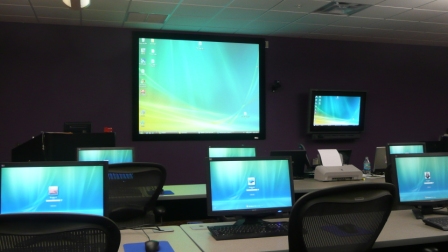 Facilities – Many of our competitors over-crowd classrooms by placing 2 to 3 students per desk and 20+ students per instructor. Often these companies “extend” the life of very old equipment with slow performance on the software used today. Our average class size is 8 students. Our facilities have the best equipment with the most comfortable, focused environment for learning.
Instructors – Our CEO holds one of the rarest Microsoft Certifications – the Microsoft Certified Learning Consultant (MCLC) Certification. This certification reflects a commitment to make sure our instructors are also actively engaged in real world consulting projects. Students expect a professional who can answer questions and demonstrate the technology.
Face to Face Training – We believe the best way to interact and learn is face to face training. Many of our competitors which offer local training are simply providing students with headphones/mic to attend class with an instructor at a remote location.
Test Pass – We offer a free retake voucher (if needed) for each of the exams required for certification. Any training center offering a “100% pass guarantee” would have to use unethical practices or unlimited test vouchers (which is not likely or practical).
Distractions – Students often look for a “local” training center so they can be close to home and work. Boot camp requires a tremendous time commitment during the program. Long class hours combined with self study each evening. The goal of boot camp is to achieve certification in a fraction of the time. We strongly recommend students attend camp away from home and work in a focused, distraction free environment.
Boot Camp – Boot camp is an accelerated training focused on teaching technology and testing students on the official exams. Most training providers “added” boot camps to the existing standard training classes they offer. These training centers think a boot camp is just a regular class where you send the student home with a voucher on the last day. Career Camps administers exams throughout the camp. Equally important – not every trainer can teach a boot camp and not all courseware is designed for boot camp format. Our trainers know the boot camp format and our courseware is designed for accelerated learning.
Florida – Career Camps has one of the most scenic locations boasting some of the best weather in US. We believe students should have a comfortable and inviting atmosphere while attending these otherwise intense programs. We place our location, facilities and amenities up against that any competitor.
What You'll Learn
- Describe VCF Automation components and supporting architecture
- Perform infrastructure management as a cloud provider
- Deploy Regions and Organizations as the cloud provider
- Configure networking at the cloud provider and organization levels
- Configure and manage content libraries at the provider and organization levels
- Manage access control in the organization using users and groups
- Create and manage infrastructure blueprints and catalogs
- Describe the use of the embedded orchestrator to create workflows
- Deploy VM workloads using catalog deployment and Kubernetes-based IaaS deployments
- List the key features of VCF Operations
- Outline VCF Operations use cases
- Create custom views and reports
- Describe the functions of dashboards
- Create custom dashboards
- Create custom symptoms and alert definitions
- Outline the role of VCF Health and Diagnostics
- Explain Troubleshooting Workbench
- Describe the VMware Cloud Foundation® Operations for logs overview
- Identify performance and health sues with the Storage clusters using Storage Operations
- Identify performance and health issues with the VCF Network objects
- Create policies to meet the operational needs of your environment
- Configure service discovery and application monitoring
Course Outline
1. VCF Automation Overview and Architecture
- Describe the features, benefits, and purposes of VCF Automation
- Explain the architecture of VCF Automation
2. Provider Infrastructure Management
- Describe the provider management and provider consumption portals
- List the supported options for provider administrator from the provider portal
- Explain managing tasks and events from the provider portal
- Describe the features of the provider consumption organization
- Describe how to discover infrastructure resources
- Explain how to manage IP spaces and provider gateways
3. Provider Identity Management
- Explain how to enable VCF SSO for the Automation appliance
- Discuss configuring VMware Cloud Foundation® Identity Broker as the identity provider
- List the supported IdP (ODIC, SAML, LDAP)
- Discuss how to register a provider-scoped identity provider
- Explain managing VCF Automation roles and rights
- Discuss managing VCF Automation users and groups
- Discuss provider-scoped service accounts
4. Regions
- Explain the basics of a Region
- Identify the utilization of the Region
- Discuss prerequisites and available options for creating a Region
5. Organizations
- Describe the different Organizations offered in VCF Automation
- Identify the use cases for manual setup and multitenancy
- Identify use cases for Quick Setup
- Create a VCF Automation VM Apps Organization
- Create a VCF Automation All Apps Organization
6. Provider Networking
- Discuss prerequisites for creating the provider network
- Discuss the workflow for configuring the provider network
- Describe IP Spaces
- Discuss Edge nodes, Edge clusters, and the network services it offers
- Configure IP Spaces and verify the configuration
- Configure the Provider Gateway and verify the status
- Synchronize Edge clusters and verify the status
- Configure regional networking for an Organization
- Discuss steps to verify the creation of network resources in VMware NSX®, VMware vCenter®, and VCF Automation.
- Discuss the mapping of resources between VCF Automation, NSX, and vCenter
7. Organization Networking with VPC
- Discuss Organization Networking
- Discuss the architecture of the VPC
- Discuss access modes and subnet types in VPC
- Describe the scope of different subnet types in VPC
- Discuss Outbound Routing and Network Address Translations in VPC
- Configure VPC with a default, custom connectivity profile and verify its status
- Configure Private-TGW IP Block, associate it with a VPC, and verify its status
8. Provider Content Library
- Describe the Provider Content Library creation workflow
- Explain publishing and subscribing to a Content Library
9. Organization Management
- Identify the key components of an All Apps Organization
- Explain namespace classes
- Explain creating and managing Projects
- Discuss Chargeback for Organizations
- Integrate identity providers into Organizations
- Manage users and groups in an Organization
- Create and manage deployment-centric policies
- Create and manage Supervisor resource-centric policies
10. Organization Content Management
- Identify and manage the different content available in Content Hub
- Differentiate between catalog self-service versus IaaS self-service
- Publish content to Catalog for end-user consumption
- Deploy and modify Catalog items
- Configure and use custom forms
- Explain the role of YAML in configuring and managing infrastructure as code
- Publish Content to Catalog for End User Consumption
- Discuss the use of the embedded orchestrator
- Discuss the use cases of an external orchestrator
11. IaaS Platform Architecture and Deployment
- Explain Supervisor architecture
- Discuss Supervisor requirements
- List Supervisor use cases
- Discuss the vSphere administrator workflow
- List the components of the Supervisor
- Discuss the types of Supervisor deployment
- Discuss the requirements of Supervisor deployment
- Describe Supervisor deployment during the VI Workload Domain creation
12. Deploying Modern Apps with IaaS
- Discuss self-service consumption with IaaS services in VCF 9
- Discuss the features of the IaaS console
- Describe how to get instance information from the console
- Explain the YAML Spec for the VM service
- Discuss VCF CLI commands
13. VCF Operations Overview
- List the key features of VCF Operations
- Outline VCF Operations use cases
- Navigate the VCF Operations console
- Identify the components of a VCF Operations node
- Describe the different roles of the node in a VCF Operations cluster
14. VCF Metrics, Views, and Reports
- Outline the role of metrics in VCF Operations
- Outline the role of views in VCF Operations
- List the steps to create a basic custom view and configure view settings
- Outline the roles of reports in VCF Operations
- List the steps to create a basic report and configure report settings
15. VCF Dashboards
- Describe the functions of dashboards
- Create dashboards that use predefined and custom widgets
- Manage dashboards by grouping and sharing with users
- Explain the use cases of predefined dashboards and custom dashboards
- List VCF Operations use cases
16. VCF Symptoms and Alerts
- Describe the purpose of using alerts
- Identify the components of an alert definition
- Create symptom definitions
- View and manage triggered alerts in the VCF Operations console
- Configure a custom alert using the Create Alert Definition workflow
17. VCF Health and Diagnostics
- Outline the role of VCF Health and Diagnostics
- Describe the VCF Health and Diagnostic Findings features
- Monitor the operational state of VCF instances
- Explain Troubleshooting Workbench
- Enable support teams with full context using Log Assist
18. VCF Logs, Storage, and Network Operations
- Describe the VCF Operations for logs overview
- Describe the key benefits of the VCF Operations for logs
- Describe the capabilities of VCF Operations for logs
- Describe the VCF Storage Operations overview
- Identify performance and health issues with the Storage clusters
- Describe the benchmarking and optimization tool to detect issues for a new cluster
- Describe the VCF Network Operations overview
- Discuss the different widgets available in VCF Network Operations
- Identify the performance and health issues with the VCF Network object
19. VCF Operations Policies
- Describe the purposes of policies in VCF Operations
- Configure policies and other components
20. VCF Centralized Monitoring
- Describe the infrastructure services monitoring capabilities
- Describe the application monitoring capabilities
- Describe the different types of application metrics
- Outline the requirements to enable service discovery and application monitoring
- Describe the different types of service metrics
- Use collected metrics to interpret the status of services
Lab Outline
- Lab 1 Case Study
- Lab 2 Exploring VMware Cloud Foundation Automation Portals
- Lab 3 Discovering VMware Cloud Foundation Entities
- Lab 4 Configuring an Identity Provider
- Lab 5 Creating a Custom Role
- Lab 6 Creating a Region
- Lab 7 Setting Up the PCO Organization
- Lab 8 Creating an Organization
- Lab 9 Configuring Provider Networking
- Lab 10 Creating a VPC
- Lab 11 Creating a Provider Content Library
- Lab 12 Creating a Project
- Lab 13 Managing Users and Roles
- Lab 14 Configuring VCF Automation Policies
- Lab 15 Creating a Local Content Library as an Organization Administrator
- Lab 16 Creating and Deploying a Blueprint
- Lab 17 Managing Catalogs
- Lab 18 Using an Orchestrator Workflow
- Lab 19 Deploying a VMUsing the Catalog Option
- Lab 20 Deploying a VM Using the IaaS Console
- Lab 21 Navigating the VCF Operations UI
- Lab 22 Creating a Custom View89
- Lab 23 Creating Custom Report Templates
- Lab 24 Creating Dashboards and Configuring Widgets
- Lab 25 Creating Custom Policies
- Lab 26 Creating Custom Symptoms
- Lab 27 Creating Custom Alert Definitions
- Lab 28 Monitoring VCFHealth andDiagnostics
- Lab 29 VCF OperationsforLogs Appliance
- Lab 30 Monitoring Storage Operations
- Lab 31 Configuring Service Discovery
- Lab 32 Configuring ApplicationMonitoring
Frequently Asked Questions
What does the VMware Cloud Foundation Automate and Operate V9.0 course teach?
This course covers the administration and operation of VCF Automation and VCF Operations. Topics include infrastructure and identity, multi-tenant organizations, regions, provider and VPC networking, content libraries, blueprints, catalogs, Supervisor-based IaaS, performance metrics, dashboards, reports, alerts, health monitoring, diagnostics, logs, storage, network operations, policies, and application monitoring.
Who should take VMware Cloud Foundation: Automate and Operate [V9.0] training?
The course is designed for IT professionals who manage or support VMware Cloud Foundation environments, including cloud administrators, virtualization administrators, system administrators, infrastructure engineers, and IT operations professionals.
Is VMware Cloud Foundation: Automate and Operate [V9.0] related to exam 2V0-17.25?
Yes. VMware Cloud Foundation: Automate and Operate [V9.0] is a recommended training course for exam 2V0-17.25, VMware Cloud Foundation Administrator. The course helps students develop knowledge and skills relevant to the exam.
What certification is associated with VMware exam 2V0-17.25?
Exam 2V0-17.25, VMware Cloud Foundation Administrator, is associated with the VMware Certified Professional – VMware Cloud Foundation Administrator (VCP-VCF Administrator) certification.
What is included with the Career Camps VMware Cloud Foundation boot camp?
The training package includes 5 days of live instructor-led training, official VMware courseware, official VMware hands-on labs, a certification exam voucher, and a retake voucher.
Related products
-

VMware Cloud Foundation: Troubleshooting [v9.0] (VCFT9)
$4,850.00 Course Details This product has multiple variants. The options may be chosen on the product page

Ready to Take the Next Step?
Choose your upcoming training date or talk with our training advisors about the right option for you or your team.