
MCA Azure Admin & MCE Solutions Architect · AZ-104 + AZ-305
Become MCA Microsoft Azure Admin & MCE Solutions Architect Certified in Just 6 Days
Live instructor-led training, official courseware, hands-on labs, exam vouchers, and a free retake — all in one package.
What's Included
Microsoft Certified Trainer (MCT) Instructor Led Live Training
2 Microsoft Official Courses (AZ-104 / AZ-305)
2 Microsoft Official Exam Vouchers (AZ-104 / AZ-305)
Free Retake Voucher for Each Exam
Microsoft Hands on Labs
Microsoft Vetted Practice Test
Onsite or Online Pearson Vue Testing
Upcoming Sessions
MCA Microsoft Azure Admin & MCE Solutions Architect Accelerated Certification Boot Camp
Scroll to see additional dates.
Date
Location / Format
Price
Oct 19–24, 2026
Sarasota, FL · Onsite
$4,995.00
Nov 16–21, 2026
Sarasota, FL · Onsite
$4,995.00
Training a Team? Get a Customized Team Quote
Volume pricing available for groups and corporate training.
Upcoming Sessions
MCA Azure Admin & MCE Solutions Architect
Course Details
MCA Microsoft Azure Admin & MCE Solutions Architect Accelerated Certification Boot Camp
Duration
6 Days
Exams Covered
AZ-104 / AZ-305
Delivery
Classroom Live
Remote Live
Remote Live
Included
Vouchers + Retake + Official Labs
Why Thousands Choose Career Camps
17+ Years of Training Experience
For more than 17 years, professionals and organizations have relied on our training expertise to build in-demand technology skills, prepare for industry certifications, and advance their teams.
5,000+ Professionals Trained
With 5,000+ professionals trained, we bring extensive experience supporting individuals, enterprise teams, government organizations, and military clients with technology skills and certification training.
Trusted by Professionals & Organizations
Trusted by thousands of IT professionals, businesses, government organizations, and enterprise teams for high-quality certification training and technology skills development.
Access to 10+ Training Providers
Get access to training from 10+ established certification training providers, giving you more options to find the right course, schedule, delivery format, and training solution for your certification goals.
Live Certified Instructors
Learn directly from experienced certified instructors—not prerecorded videos or self-paced material.
Official Training
Train with authorized, official courseware and curriculum from leading technology certification providers. Get the same industry-recognized training designed to prepare professionals for today’s most in-demand certifications and technology roles.
Course Description
Description
Our Facilities
CAREER CAMPS FACILITIES
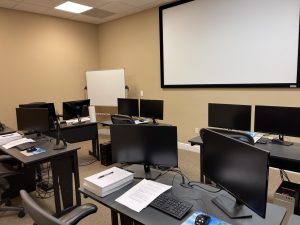 CAMPUS – Career Camps built out a stand alone training center (not a hotel conference room) with spacious classrooms, new desk, Herman Miller Aeron chairs & comfortable common areas. Each student has a dedicated desk with two monitors. Each classroom has a maximum of two rows – so everyone is able to be engaged without the “back row” feeling.
CLASSROOM EQUIPMENT – Students work on a dedicated Dell Client Desktop with 32GB memory with 512GB SSD drives – All Labs are executed the extremely fast Microsoft Data Center Hosted Lab Environment.
CAMPUS INTERNET – The campus is connected with a 1Gbps (1,000 Mbps) Verizon Fios Business Connection which provides complete internet (including VPN) access for students.
COMMON AREA – Amenities including snacks, drinks (Coffee, 100% juices, sodas, etc) all complimentary.
LODGING – We use the Hyatt Place Lakewood Ranch. This “upgraded” hotel offers extremely comfortable beds, great breakfast and very fast internet access.
NEAR BY AMENITIES – Many shops, restaurants and grocery options are available within walking distance. Additionally – the hotel provided scheduled shuttle services. Restaurants like Bone Fish Grill, Ruby Tuesday’s, Five Guys, Chipotle, Quiznos, Chili’s and over 20 additional choices in the immediate area. All of these options are offered in a pedestrian walking village.
Why Choose Us
CAREER CAMPS DIFFERENCE
Career Camps provides an in-depth hands on learning environment. Our instructors teach using demonstrations and explain concepts beyond the scope of the courseware. The best instructors are contracted from all across the US. These professionals are real world consultants who actually implement these technologies. Career Camps knows our clients work in the “real world” and it only makes sense to have an instructor with the experience in the real world.
 Facilities – Many of our competitors over-crowd classrooms by placing 2 to 3 students per desk and 20+ students per instructor. Often these companies “extend” the life of very old equipment with slow performance on the software used today. Our average class size is 8 students. Our facilities have the best equipment with the most comfortable, focused environment for learning.
Instructors – Our CEO holds one of the rarest Microsoft Certifications – the Microsoft Certified Learning Consultant (MCLC) Certification. This certification reflects a commitment to make sure our instructors are also actively engaged in real world consulting projects. Students expect a professional who can answer questions and demonstrate the technology.
Face to Face Training – We believe the best way to interact and learn is face to face training. Many of our competitors which offer local training are simply providing students with headphones/mic to attend class with an instructor at a remote location.
Test Pass – We offer a free retake voucher (if needed) for each of the exams required for certification. Any training center offering a “100% pass guarantee” would have to use unethical practices or unlimited test vouchers (which is not likely or practical).
Distractions – Students often look for a “local” training center so they can be close to home and work. Boot camp requires a tremendous time commitment during the program. Long class hours combined with self study each evening. The goal of boot camp is to achieve certification in a fraction of the time. We strongly recommend students attend camp away from home and work in a focused, distraction free environment.
Boot Camp – Boot camp is an accelerated training focused on teaching technology and testing students on the official exams. Most training providers “added” boot camps to the existing standard training classes they offer. These training centers think a boot camp is just a regular class where you send the student home with a voucher on the last day. Career Camps administers exams throughout the camp. Equally important – not every trainer can teach a boot camp and not all courseware is designed for boot camp format. Our trainers know the boot camp format and our courseware is designed for accelerated learning.
Florida – Career Camps has one of the most scenic locations boasting some of the best weather in US. We believe students should have a comfortable and inviting atmosphere while attending these otherwise intense programs. We place our location, facilities and amenities up against that any competitor.
What You'll Learn
- Manage Azure identities and governance
- Implement and manage storage
- Deploy and manage Azure compute resources
- Configure and manage virtual networking
- Monitor and back up Azure resources
- Design identity, governance, and monitoring solutions
- Design data storage solutions
- Design business continuity solutions
- Design infrastructure solutions
Course Outline
Use Azure Resource Manager
- Identify the features and usage cases for Azure Resource Manager.
- Describe each Azure Resource Manager component and its usage.
- Organize your Azure resources with resource groups.
- Apply Azure Resource Manager locks.
- Move Azure resources between groups, subscriptions, and regions.
- Remove resources and resource groups.
- Apply and track resource limits.
- Review Azure Resource Manager benefits
- Review Azure resource terminology
- Create resource groups
- Create Azure Resource Manager locks
- Reorganize Azure resources
- Remove resources and resource groups
- Determine resource limits
Introduction to Azure Cloud Shell
- Experience with Azure virtual machines (VMs)
- Experience with Azure virtual networks
- Experience with routing and routing protocols
- The ability to navigate the Azure portal and use Azure PowerShell
- What is Azure Cloud Shell?
- How does Azure Cloud Shell work?
- When should you use Azure Cloud Shell?
Introduction to Bash
- Learn what shells are and what Bash is.
- Learn about the syntax of Bash commands.
- Learn about important Bash commands, such as ls, cat, and ps.
- Learn how to use I/O operators to redirect input and output.
- Learn how to update a server’s operating system.
- Learn how to find and terminate rogue processes.
- Learn how to use Bash to filter Azure CLI output.
- What is Bash?
- Bash fundamentals
- Bash commands and operators
- Exercise – Try Bash
- Exercise – Terminate a misbehaving process
- Exercise – Use Bash and grep to filter CLI output
Introduction to PowerShell
- Basic familiarity with using a command-line shell like Command Prompt or Git Bash
- Visual Studio Code installed
- Ability to install Visual Studio Code extensions
- Ability to install software on your computer, if you’re not using a Windows operating system
- What is PowerShell?
- Exercise – Run your first PowerShell commands
- Locate commands
- Exercise – Locate commands
Configure resources with Azure Resource Manager templates
- List the advantages of Azure templates.
- Identify the Azure template schema components.
- Specify Azure template parameters.
- Locate and use Azure Quickstart Templates.
- Review Azure Resource Manager template advantages
- Explore the Azure Resource Manager template schema
- Explore the Azure Resource Manager template parameters
- Consider Bicep templates
- Review QuickStart templates
- Interactive lab simulation – templates
Understand Microsoft Entra ID
- Describe Microsoft Entra ID.
- Compare Microsoft Entra ID to Active Directory Domain Services (AD DS).
- Describe how Microsoft Entra ID is used as a directory for cloud apps.
- Describe Microsoft Entra ID P1 and P2.
- Describe Microsoft Entra Domain Services.
- Examine Microsoft Entra ID
- Compare Microsoft Entra ID and Active Directory Domain Services
- Examine Microsoft Entra ID as a directory service for cloud apps
- Compare Microsoft Entra ID P1 and P2 plans
- Examine Microsoft Entra Domain Services
Configure user and group accounts
- Configure users accounts and user account properties.
- Create new user accounts.
- Import bulk user accounts with a template.
- Configure group accounts and assignment types.
- Create user accounts
- Manage user accounts
- Create bulk user accounts
- Create group accounts
- Create administrative units
- Interactive lab simulation
Configure Subscriptions
- Determine the correct region to locate Azure services.
- Review features and use cases for Azure subscriptions.
- Obtain an Azure subscription.
- Understand billing and features for different Azure subscriptions.
- Use Microsoft Cost Management for cost analysis.
- Discover when to use Azure resource tagging.
- Identify ways to reduce costs.
- Identify Azure regions
- Implement Azure subscriptions
- Obtain an Azure subscription
- Identify Azure subscription usage
- Implement Microsoft Cost Management
- Apply resource tagging
- Apply cost savings
Configure Azure Policy
- Create management groups to target policies and spending budgets
- Implement Azure Policy with policy and initiative definitions
- Scope Azure policies and determine compliance
- Create management groups
- Implement Azure policies
- Create Azure policies
- Create policy definitions
- Create an initiative definition
- Scope the initiative definition
- Determine compliance
- Interactive lab simulation
Configure role-based access control
- Identify features and use cases for role-based access control.
- List and create role definitions.
- Create role assignments.
- Identify differences between Azure RBAC and Microsoft Entra roles.
- Manage access to subscriptions with RBAC.
- Review built-in Azure RBAC roles.
- Implement role-based access control
- Create a role definition
- Create a role assignment
- Compare Azure roles to Microsoft Entra roles
- Apply role-based access control
- Review fundamental Azure RBAC roles
- Interactive lab simulation
Create Azure users and groups in MIcrosoft Entra ID
- Add users to Microsoft Entra ID.
- Manage app and resource access by using Microsoft Entra groups.
- Give guest users access in Microsoft Entra business to business (B2B).
- What are user accounts in Microsoft Entra ID?
- Exercise – Add and delete users in Microsoft Entra ID
- Manage app and resource access by using Microsoft Entra groups
- Exercise – Assign users to Microsoft Entra groups
- Collaborate by using guest accounts and Microsoft Entra B2B
- Exercise – Give guest users access in Microsoft Entra B2B
Secure your Azure resources with Azure role-based access control (Azure RBAC)
- Verify access to resources for yourself and others.
- Grant access to resources.
- View activity logs of Azure RBAC changes.
- What is Azure RBAC?
- Knowledge check – What is Azure RBAC?
- Exercise – List access using Azure RBAC and the Azure portal
- Exercise – Grant access using Azure RBAC and the Azure portal
- Exercise – View activity logs for Azure RBAC changes
Allow users to reset their password with Microsoft Entra self-service password reset
- Decide whether to implement self-service password reset.
- Implement self-service password reset to meet your requirements.
- Configure self-service password reset to customize the experience.
- What is self-service password reset in Microsoft Entra ID?
- Implement Microsoft Entra self-service password reset
- Exercise – Set up self-service password reset
- Exercise – Customize directory branding
Configure storage accounts
- Implement Azure Storage
- Explore Azure Storage services
- Determine storage account types
- Determine replication strategies
- Access storage
- Secure storage endpoints
Configure Azure Blob Storage
- Understand the purpose and benefits of Azure Blob Storage.
- Create and configure Azure Blob Storage accounts.
- Manage containers and blobs within Azure Blob Storage.
- Optimize blob storage performance and scalability.
- Implement lifecycle management policies to automate data movement and deletion.
- Determine the best pricing plans for your Azure Blob Storage.
- Implement Azure Blob Storage
- Create blob containers
- Assign blob access tiers
- Add blob lifecycle management rules
- Determine blob object replication
- Upload blobs
- Determine Blob Storage pricing
- Interactive lab simulation
Configure Azure Storage security
- Configure a shared access signature (SAS), including the uniform resource identifier (URI) and SAS parameters.
- Configure Azure Storage encryption.
- Implement customer-managed keys.
- Recommend opportunities to improve Azure Storage security.
- Review Azure Storage security strategies
- Create shared access signatures
- Identify URI and SAS parameters
- Determine Azure Storage encryption
- Create customer-managed keys
- Apply Azure Storage security best practices
- Interactive lab simulation
Configure Azure Flies and Azure File Sync
- Identify storage for file shares versus blob data.
- Configure Azure file shares and file share snapshots.
- Identify features and use cases of Azure File Sync.
- Identify Azure File Sync components and configuration steps.
- Compare storage for file shares and blob data
- Manage Azure file shares
- Create file share snapshots
- Implement soft delete for Azure Files
- Use Azure Storage Explorer
- Deploy Azure File Sync
Create an Azure Store account
- Decide how many storage accounts you need for your project
- Determine the appropriate settings for each storage account
- Create a storage account using the Azure portal
- Decide how many storage accounts you need
- Choose your account settings
- Choose an account creation tool
- Exercise – Create a storage account using the Azure portal
Control access to Azure Storage with shared access signatures
- Identify the features of a shared access signature for Azure Storage.
- Identify the features of stored access policies.
- Programmatically generate and use a shared access signature to access storage.
- Authorization options for Azure Storage
- Use shared access signatures to delegate access to Azure Storage
- Exercise – Use shared access signatures to delegate access to Azure Storage
- Use stored access policies to delegate access to Azure Storage
- Exercise – Use stored access policies to delegate access to Azure Storage
Upload, download, and manage data with Azure Storage Explorer
- Describe the features of Azure Storage Explorer.
- Install Storage Explorer.
- Use Storage Explorer to connect to Azure Storage services and manipulate stored data.
- Connect Azure Storage Explorer to a storage account
- Exercise – Connect Azure Storage Explorer to a storage account
- Connect Azure Storage Explorer to Azure Data Lake Storage
- Exercise – Connect Azure Storage Explorer to Azure Data Lake Storage
Configure virtual machines
- Determine the responsibilities of cloud service providers and customers in a cloud computing environment.
- Identify the key considerations and factors involved in planning for virtual machines. Considerations include workload requirements, resource allocation, and secure access.
- Configure virtual machine storage and virtual machine sizing.
- Create a virtual machine in the Azure portal.
- Practice deploying an Azure virtual machine and verify the configuration.
- Review cloud services responsibilities
- Plan virtual machines
- Determine virtual machine sizing
- Determine virtual machine storage
- Create virtual machines in the Azure portal
- Connect to virtual machines
- Interactive lab simulation
Configure virtual machine availability
- Implement availability sets and availability zones.
- Implement update and fault domains.
- Implement Azure Virtual Machine Scale Sets.
- Autoscale virtual machines
- Plan for maintenance and downtime
- Create availability sets
- Review update domains and fault domains
- Review availability zones
- Compare vertical and horizontal scaling
- Implement Azure Virtual Machine Scale Sets
- Create Virtual Machine Scale Sets
- Implement autoscale
- Configure autoscale
- Interactive lab simulation
Configure Azure App Service plans
- Identify features and usage cases for Azure App Service.
- Select an appropriate Azure App Service plan pricing tier.
- Scale an Azure App Service plan.
- Implement Azure App Service plans
- Determine Azure App Service plan pricing
- Scale up and scale out Azure App Service
- Configure Azure App Service autoscale
Configure Azure App Service
- Identify features and usage cases for Azure App Service.
- Create an app with Azure App Service.
- Configure deployment settings, specifically deployment slots.
- Secure your Azure App Service app.
- Configure custom domain names.
- Back up and restore your Azure App Service app.
- Configure Azure Application Insights.
- Implement Azure App Service
- Create an app with App Service
- Explore continuous integration and deployment
- Create deployment slots
- Add deployment slots
- Secure your App Service app
- Create custom domain names
- Back up and restore your App Service app
- Use Azure Application Insights
- Interactive lab simulation
Configure Azure Container Instances
- Identify when to use containers versus virtual machines.
- Identify the features and usage cases of Azure Container Instances.
- Implement Azure container groups.
- Compare containers to virtual machines
- Review Azure Container Instances
- Implement container groups
- Review Azure Container Apps
- Interactive lab simulation
Manage virtual machines with the Azure CLI
- Create a virtual machine with the Azure CLI.
- Resize virtual machines with the Azure CLI.
- Perform basic management tasks using the Azure CLI.
- Connect to a running VM with SSH and the Azure CLI.
- Exercise – Create a virtual machine
- Exercise – Test your new virtual machine
- Exercise – Explore other VM images
- Exercise – Sizing VMs properly
- Exercise – Query system and runtime information about the VM
- Exercise – Start and stop your VM with the Azure CL
- Exercise – Install software on your VM
Create a Windows virtual machine in Azure
- Create a Windows virtual machine using the Azure portal.
- Connect to a running Windows virtual machine using Remote Desktop.
- Install software and change the network configuration on a VM using the Azure portal.
- Create a Windows virtual machine in Azure
- Exercise – Create a Windows virtual machine
- Use RDP to connect to Windows Azure virtual machines
- Exercise – Connect to a Windows virtual machine using RDP
- Configure Azure virtual machine network settings
Host a web application with Azure App Service
- Use the Azure portal to create an Azure App Service web app.
- Use developer tools to create the code for a starter web application.
- Deploy your code to Azure App Service.
- Create a web app in the Azure portal
- Exercise – Create a web app in the Azure portal
- Prepare the web application code
- Exercise – Write code to implement a web application
- Deploy code to App Service
- Exercise – Deploy your code to App Service
Configure virtual networks
- Describe Azure virtual network features and components.
- Identify features and usage cases for subnets and subnetting.
- Identify usage cases for private and public IP addresses.
- Create a virtual network and assign IP address.
- Plan virtual networks
- Create subnets
- Create virtual networks
- Plan IP addressing
- Create public IP addressing
- Associate public IP addresses
- Allocate or assign private IP addresses
- Interactive lab simulation
Configure network security groups
- Determine when to use network security groups.
- Create network security groups.
- Implement and evaluate network security group rules.
- Describe the function of application security groups.
- Implement network security groups
- Determine network security group rules
- Determine network security group effective rules
- Create network security group rules
- Implement application security groups
- Interactive lab simulation
Configure Azure Virtual Network peering
- Identify usage cases and product features of Azure Virtual Network peering.
- Configure your network to implement Azure VPN Gateway for transit connectivity.
- Extend peering by using a hub and spoke network with user-defined routes and service chaining.
- Determine Azure Virtual Network peering uses
- Determine gateway transit and connectivity
- Create virtual network peering
- Extend peering with user-defined routes and service chaining
- Interactive lab simulation
Configure network routing and endpoints
- Implement system routes and user-defined routes.
- Configure a custom route.
- Implement service endpoints.
- Identify features and usage cases for Azure Private Link and endpoint services.
- Review system routes
- Identify user-defined routes
- Determine service endpoint uses
- Determine service endpoint services
- Identify private link uses
- Interactive lab simulation
Configure Azure Load Balancer
- Identify features and usage cases for Azure Load Balancer.
- Implement public and internal Azure load balancers.
- Compare features of load balancer SKUs and configuration differences.
- Configure back-end pools, load-balancing rules, session persistence, and health probes
- Determine Azure Load Balancer uses
- Implement a public load balancer
- Implement an internal load balancer
- Determine load balancer SKUs
- Create back-end pools
- Create health probes
- Create load balancer rules
Configure Azure Application Gateway
- Identify features and usage cases for Azure Application Gateway.
- Implement an Azure application gateway, including selecting a routing method.
- Configure gateway components, such as listeners, health probes, and routing rules.
- Implement Azure Application Gateway
- Determine Azure Application Gateway routing
- Configure Azure Application Gateway components
Design an IP adressing schema for your Azure deployment
- Identify the private IP addressing capabilities of Azure virtual networks.
- Identify the public IP addressing capabilities of Azure.
- Identify the requirements for IP addressing when integrating with on-premises networks.
- Network IP addressing and integration
- Public and private IP addressing in Azure
- Plan IP addressing for your networks
- Exercise – Design and implement IP addressing for Azure virtual networks
Distribute your services across Azure virtual networks and integrate them by using virtual network peering
- Identify use cases for virtual network peering.
- Identify the features and limitations of virtual network peering.
- Configure peering connections between virtual networks.
- Connect services by using virtual network peering
- Exercise – Prepare virtual networks for peering by using Azure CLI commands
- Exercise – Configure virtual network peering connections by using Azure CLI commands
- Exercise – Verify virtual network peering by using SSH between Azure virtual machines
Host your domain on Azure DNS
- What is Azure DNS?
- Configure Azure DNS to host your domain
- Exercise – Create a DNS zone and an A record by using Azure DNS
- Dynamically resolve resource name by using alias record
- Exercise – Create alias records for Azure DNS
Manage and control traffic flow in your Azure deployment with routes
- Identify the routing capabilities of an Azure virtual network
- Configure routing within a virtual network
- Deploy a basic network virtual appliance
- Configure routing to send traffic through a network virtual appliance
- Identify routing capabilities of an Azure virtual network
- Exercise – Create custom routes
- What is an NVA?
- Exercise – Create an NVA and virtual machines
- Exercise – Route traffic through the NVA
Improve application scalability and resiliency by using Azure Load Balancer
- Identify the features and capabilities of Azure Load Balancer.
- Deploy and configure an Azure Load Balancer.
- Azure Load Balancer features and capabilities
- Configure a public load balancer
- Exercise – Configure a public load balancer
- Internal load balancer
Introduction to Azure Backup
- Basic knowledge of navigating the Azure portal
- Basic knowledge of file and folder backup concepts
- Basic knowledge of Azure Files shares, Azure VMs, and Azure Managed Disks
- Basic knowledge of on-premises backup scenarios
- What is Azure Backup?
- How Azure Backup works
- When to use Azure Backup
Configure virtual machine backups
- Identify features and usage cases for different Azure backup methods.
- Configure virtual machine snapshots and backup options.
- Implement virtual machine backup and restore, including soft delete.
- Perform site-to-site recovery by using Azure Site Recovery.
- Explore options to protect virtual machine data
- Create virtual machine snapshots in Azure Backup
- Set up Azure Recovery Services vault backup options
- Back up your virtual machines
- Restore your virtual machines
- Implement soft delete for your virtual machines
- Implement Azure Site Recovery
- Interactive lab simulation
Configure Azure Monitor
- Identify the features and usage cases for Azure Monitor.
- Configure and interpret metrics and logs.
- Identify the Azure Monitor components and data types.
- Configure the Azure Monitor activity log.
- Describe Azure Monitor key capabilities
- Describe Azure Monitor components
- Define metrics and logs
- Identify monitoring data and tiers
- Describe activity log events
- Query the activity log
- Interactive lab simulation
Configure Log Analytics
- Identify the features and usage cases for Log Analytics.
- Create a Log Analytics workspace.
- Structure a Log Analytics query and review results.
- Determine Log Analytics uses
- Create a Log Analytics workspace
- Create Kusto (KQL) queries
- Structure Log Analytics queries
Configure Network Watcher
- Identify the features and usage cases for Azure Network Watcher.
- Configure diagnostic capabilities like IP Flow Verify, Next Hop, and Network Topology.
- Describe Azure Network Watcher features
- Review IP flow verify diagnostics
- Review next hop diagnostics
- Visualize the network topology
Improve incident response with Azure Monitor alerts
- Configure alerts on events in your Azure resources based on metrics, log events, and activity log events.
- Learn how to use action groups in response to an alert, and how to use alert processing rules to override action groups when necessary.
- Explore the different alert types that Azure Monitor supports
- Use metric alerts for alerts about performance issues in your Azure environment
- Exercise – Use metric alerts to alert on performance issues in your Azure environment
- Use log alerts to alert on events in your application
- Use activity log alerts to alert on events within your Azure infrastructure
- Use action groups and alert processing rules to send notifications when an alert is fired
- Exercise -Use an activity log alert and an action group to notify users about events in your Azure infrastructure
Analyze your Azure infrastructure by using Azure Monitor logs
- Identify the features and capabilities of Azure Monitor logs.
- Create basic Azure Monitor log queries to extract information from log data.
- Features of Azure Monitor logs
- Create basic Azure Monitor log queries to extract information from log data
- Exercise – Create basic Azure Monitor log queries to extract information from log data
Monitor your Azure virtual machines with Azure Monitor
- Understand which monitoring data you need to collect from your VM.
- Enable and view recommended alerts and diagnostics.
- Use Azure Monitor to collect and analyze VM host metrics data.
- Use Azure Monitor Agent to collect VM client performance metrics and event logs.
Describe the core architectural components of Azure
- Describe Azure regions, region pairs, and sovereign regions
- Describe Availability Zones
- Describe Azure datacenters
- Describe Azure resources and Resource Groups
- Describe subscriptions
- Describe management groups
- Describe the hierarchy of resource groups, subscriptions, and management groups
- What is Microsoft Azure
- Get started with Azure accounts
- Exercise – Explore the Learn sandbox
- Describe Azure physical infrastructure
- Describe Azure management infrastructure
- Exercise – Create an Azure resource
Describe Azure compute and networking services
- Compare compute types, including container instances, virtual machines, and functions
- Describe virtual machine (VM) options, including VMs, Virtual Machine Scale Sets, availability sets, Azure Virtual Desktop
- Describe resources required for virtual machines
- Describe application hosting options, including Azure Web Apps, containers, and virtual machines
- Describe virtual networking, including the purpose of Azure Virtual Networks, Azure virtual subnets, peering, Azure DNS, VPN Gateway, and ExpressRoute
- Define public and private endpoints
- Describe Azure virtual machines
- Exercise – Create an Azure virtual machine
- Describe Azure virtual desktop
- Describe Azure containers
- Describe Azure functions
- Describe application hosting options
- Describe Azure virtual networking
- Exercise – Configure network access
- Describe Azure virtual private networks
- Describe Azure ExpressRoute
- Describe Azure DNS
Describe azure storage services
- Compare Azure storage services
- Describe storage tiers
- Describe redundancy options
- Describe storage account options and storage types
- Identify options for moving files, including AzCopy, Azure Storage Explorer, and Azure File Sync
- Describe migration options, including Azure Migrate and Azure Data Box
- Describe Azure storage accounts
- Describe Azure storage redundancy
- Describe Azure storage services
- Exercise – Create a storage blob
- Identify Azure data migration options
- Identify Azure file movement options
Describe Azure identity, access, and security
- Describe directory services in Azure, including Microsoft Entra ID and Microsoft Entra Domain Services
- Describe authentication methods in Azure, including single sign-on (SSO), multifactor authentication (MFA), and passwordless
- Describe external identities and guest access in Azure
- Describe Microsoft Entra Conditional Access
- Describe Azure Role Based Access Control (RBAC)
- Describe the concept of Zero Trust
- Describe the purpose of the defense in depth model
- Describe the purpose of Microsoft Defender for Cloud
- Describe Azure directory services
- Describe Azure authentication methods
- Describe Azure external identities
- Describe Azure conditional access
- Describe Azure role-based access control
- Describe zero trust model
- Describe defense-in-depth
- Describe Microsoft Defender for Cloud
Microsoft Cloud Adoption Framework for Azure
- Learn how to leverage the Cloud Adoption Framework to identify where your organization is in the digital transformation journey.
- Identify triggers and opportunities for cloud adoption.
- Recognize the components needed to develop a digital transformation strategy around your business, people, and technology.
- Define strategy
- Plan
- Ready
- Adopt
- Govern and manage
Introduction to the Microsoft Azure Well-Architected Framework
- Describe the pillars of the Azure Well-Architected Framework
- Identify key principles for creating a solid architectural foundation
- Azure Well-Architected Framework pillars
- Cost optimization
- Operational excellence
- Performance efficiency
- Reliability
- Security
Design governance
- Design for governance.
- Design for management groups.
- Design for Azure subscriptions.
- Design for resource groups.
- Design for resource tagging.
- Design for Azure Policy.
- Design for Azure role-based access control.
- Design for Azure landing zones.
- Design for governance
- Design for management groups
- Design for subscriptions
- Design for resource groups
- Design for resource tags
- Design for Azure Policy
- Design for role-based access control (RBAC)
- Design for Azure landing zones
Design authentication and authorization solutions
- Design for identity and access management.
- Design for Microsoft Entra ID.
- Design for Microsoft Entra business-to-business (B2B).
- Design for Azure Active Directory B2C (business-to-customer).
- Design for conditional access.
- Design for identity protection.
- Design for access reviews.
- Design for managed identities.
- Design for service principals for applications.
- Design for Azure Key Vault.
- Design for identity and access management (IAM)
- Design for Microsoft Entra ID
- Design for Microsoft Entra business-to-business (B2B)
- Design for Azure Active Directory B2C (business-to-customer)
- Design for conditional access
- Design for identity protection
- Design for access reviews
- Design service principals for applications
- Design managed identities
- Design for Azure Key Vault
Design a solution to log and monitor Azure resources
- Design for Azure Monitor data sources
- Design for Azure Monitor Logs (Log Analytics) workspaces
- Design for Azure Workbooks and Azure insights
- Design for Azure Data Explorer
- Design for Azure Monitor data sources
- Design for Azure Monitor Logs (Log Analytics) workspaces
- Design for Azure Workbooks and Azure insights
- Design for Azure Data Explorer
Describe high availability and disaster recovery strategies
- Define recovery time objective and recovery point objective
- Explore the available high availability and disaster recovery options for both IaaS and PaaS
- Devise an appropriate high availability and disaster recovery strategy
- Describe recovery time objective and recovery point objective
- Explore high availability and disaster recovery options
- Describe Azure high availability and disaster recovery features for Azure Virtual Machines
- Describe high availability and disaster recovery options for PaaS deployments
- Explore an IaaS high availability and disaster recovery solution
- Describe hybrid solutions
Design a solution for backup and disaster recovery
- Design for backup and recovery.
- Design for Azure Backup.
- Design for Azure blob backup and recovery.
- Design for Azure Files backup and recovery.
- Design for Azure virtual machine backup and recovery.
- Design for Azure SQL backup and recovery.
- Design for Azure Site Recovery.
- Design for backup and recovery
- Design for Azure Backup
- Design for Azure blob backup and recovery
- Design for Azure files backup and recovery
- Design for Azure virtual machine backup and recovery
- Design for Azure SQL backup and recovery
- Design for Azure Site Recovery
Design a data storage for non-relational data
- Design for data storage.
- Design for Azure storage accounts.
- Design for Azure blob storage.
- Design for data redundancy.
- Design for Azure files.
- Design an Azure disk solution.
- Design for storage security.
- Design for data storage
- Design for Azure storage accounts
- Design for data redundancy
- Design for Azure Blob Storage
- Design for Azure Files
- Design for Azure managed disks
- Design for storage security
Design a data storage solution for relational data
- Design for Azure SQL Database.
- Design for Azure SQL Managed Instance.
- Design for SQL Server on Azure Virtual Machines.
- Recommend a solution for database scalability.
- Recommend a solution for database availability.
- Design protection for data at rest, data in transmission, and data in use.
- Design for Azure SQL Edge.
- Design for Azure Cosmos DB.
- Design for Azure Table Storage.
- Design for Azure SQL Database
- Design for Azure SQL Managed Instance
- Design for SQL Server on Azure Virtual Machines
- Recommend a solution for database scalability
- Recommend a solution for database availability
- Design security for data at rest, data in motion, and data in use
- Design for Azure SQL Edge
- Design for Azure Cosmos DB and Table Storage
Design data integration
- Design a data integration solution with Azure Data Factory.
- Design a data integration solution with Azure Data Lake.
- Design a data integration and analytics solution with Azure Databricks.
- Design a data integration and analytics solution with Azure Synapse Analytics.
- Design strategies for hot, warm, and cold data paths.
- Design an Azure Stream Analytics solution for data analysis.
- Design a data integration solution with Azure Data Factory
- Design a data integration solution with Azure Data Lake
- Design a data integration and analytic solution with Azure Databricks
- Design a data integration and analytic solution with Azure Synapse Analytics
- Design strategies for hot, warm, and cold data paths
- Design an Azure Stream Analytics solution for data analysis
Design an Azure compute solution
- Choose an Azure compute service.
- Design for Azure Virtual Machines solutions.
- Design for Azure Batch solutions.
- Design for Azure App Service solutions.
- Design for Azure Container Instances solutions.
- Design for Azure Kubernetes Service solutions.
- Design for Azure Functions solutions.
- Design for Azure Logic Apps solutions.
- Choose an Azure compute service
- Design for Azure Virtual Machines solutions
- Design for Azure Batch solutions
- Design for Azure App Service solutions
- Design for Azure Container Instances solutions
- Design for Azure Kubernetes Service solutions
- Design for Azure Functions solutions
- Design for Azure Logic Apps solutions
Design an application architecture
- Describe message and event scenarios.
- Design a messaging solution.
- Design an Azure Event Hubs messaging solution.
- Design an event-driven solution.
- Design an automated app deployment solution.
- Design API integration.
- Design an application configuration management solution.
- Design a caching solution.
- Describe message and event scenarios
- Design a messaging solution
- Design an Azure Event Hubs messaging solution
- Design an event-driven solution
- Design a caching solution
- Design API integration
- Design an automated app deployment solution
- Design an app configuration management solution
Design network solutions
- Recommend a network architecture solution based on workload requirements
- Design for on-premises connectivity to Azure Virtual Network
- Design for Azure network connectivity services
- Design for application delivery services
- Design for application protection services
- Recommend a network architecture solution based on workload requirements
- Design patterns for Azure network connectivity services
- Design outbound connectivity and routing
- Design for on-premises connectivity to Azure Virtual Network
- Choose an application delivery service
- Design for application delivery services
- Design for application protection services
Design migrations
- Evaluate migration with the Microsoft Cloud Adoption Framework for Azure
- Describe the Azure Migration and Modernization Program (Azure Migration Framework)
- Assess your on-premises workloads
- Select a migration tool
- Migrate your databases
- Select an online storage migration tool
- Migrate offline data
- Evaluate migration with the Cloud Adoption Framework
- Describe the Azure migration framework
- Assess your on-premises workloads
- Select a migration tool
- Migrate your structured data in databases
- Select an online storage migration tool for unstructured data
- Migrate offline data
Microsoft Azure Well-Architected Framework - Cost Optimization
- Build a team culture that has awareness of budget, expenses, reporting, and cost tracking
- Spend only on what you need to achieve the highest return on your investments
- Maximize the use of resources and operations
- Increase efficiency without redesigning, renegotiating, or sacrificing requirements
- Continuously right-size investment as your workload evolves
- Develop cost-management discipline
- Design with a cost-efficiency mindset
- Design for usage optimization
- Design for rate optimization
- Monitor and optimize over time
Micrososft Azure Well-Architected Framework - Operational excellence
- Apply modern practices to design, build, and orchestrate resources on Azure
- Gain operational insights by using monitoring and analytics
- Reduce effort and error by using automation
- Identify issues and improve quality in your application by using tests
- Embrace DevOps culture
- Establish development standards
- Evolve operations with observability
- Deploy with confidence
- Automate for efficiency
- Adopt safe deployment practices
Microsoft Azure Well-Architected Framework - Performance efficiency
- Scale your capacity based on workload.
- Optimize network performance.
- Optimize storage and database performance.
- Improve application performance by identifying bottlenecks.
- Negotiate realistic performance targets
- Design to meet capacity requirements
- Achieve and sustain performance
- Improve efficiency through optimization
Microsoft Azure Well-Architected Framework - Reliability
- Determine the reliability requirements from the business and apply those requirements to your workload design.
- Design your workload to be fault-tolerant and able to degrade gracefully.
- Design your workload to recover from malfunctions ranging from component-level faults to disasters.
- Build observability and testing into your workload design and operations practices.
- Design your workload with a focus on simplicity to minimize risks.
- Design for business requirements
- Design for resilience
- Design for recovery
- Design for operations
- Keep it simple
Microsoft Azure Well-Architected Framework - Security
- Create a security readiness plan that’s aligned with business priorities.
- Properly handle confidentiality requirements.
- Strengthen the integrity of your workload against security risks.
- Strengthen the availability of your workload against security incidents.
- Continuously maintain and improve your workload’s security posture
- Plan your security readiness
- Design to protect confidentiality
- Design to protect integrity
- Design to protect availability
- Sustain and evolve your security posture
Getting started with the Microsoft Cloud Adoption Framework for Azure
- Understand common roadblocks that prevent adoption success.
- Evaluate one or more guides that can help you get things started or move faster.
- Get started on the proper course of action by using shared guidance and related Learn modules.
- Customer narrative
- Common blockers
Prepare for successful cloud adoption with a well-defined strategy
- Create clarity for a corporate strategy to ensure that all team members are working toward common goals.
- Establish metrics to create clarity, help the team learn, and systematically work toward your organizational objectives.
- Evaluate financial considerations to understand the value of cloud adoption.
- Assess your strategy using the Cloud Adoption Strategy.
- Evaluate technical considerations to help the team prepare for successful cloud adoption projects.
- Customer narrative
- Capture strategic motivation
- Define objectives and key results
- Evaluate financial considerations
- Understand technical considerations
- Create a business case
Prepare for cloud adoption with a data-driven plan
- Create an actionable cloud adoption plan.
- Understand your digital estate.
- Assess the digital estate with Azure Migrate and refine your plan.
- Exercise – Deploy your first cloud adoption plan
- Exercise – Assess your digital estate
- Exercise – Customize your cloud adoption plan
Choose the best Azure landing zone to support your requirements for cloud operations
- Compare your management, governance, and security requirements for operations to common operating models.
- Evaluate options for implementing Azure landing zones against your short-term and long-term requirements.
- Choose the best Azure landing zone and Learn modules to support your needs for cloud adoption.
- Common operating models
- Design areas for Azure landing zones
- Design principles for Azure landing zones
- Journey to the target architecture
- Choose an Azure landing zone option
- Deploy the Azure landing zone accelerator
- Enhance your landing zone
Migrate to Azure through repeatable processes and common tools
- Understand the tools commonly used in migration
- Learn about the migration processes required to migrate effectively
- Demonstrate a migration (hands-on if possible)
- Understand options for properly migrating various platforms and workloads
- Choose the best learning path to continue on with migrating a specific platform or workload
- Migration process
- Migration tools
- Common tech platforms
- Exercise – Migration and modernization
Address tangible risks with the Govern methodology of the Cloud Adoption Framework for Azure
- Establish processes to properly govern cloud adoption.
- Classify tangible risks based on the reference cloud adoption plan.
- Integrate corporate policies to mitigate tangible risks.
- List implementation strategies to mitigate risks.
- Demonstrate Azure Policy additions that implement risk mitigation strategies.
- Prioritize future governance investments.
- Govern methodology
- Corporate policies
- Governance disciplines
- Knowledge check
- Deploy a cloud governance foundation
- The Cost Management discipline
Ensure stable operations and optimization across all supported workloads deployed to the cloud
- Evaluate levels of business commitment across your portfolio of workloads
- Deploy an operations baseline
- Customize the baseline to meet operations needs
- Centralize operations for core platforms
- Partner with workload teams for richer decentralized operations
- Establish business commitments
- Deploy an operations baseline
- Protect and recover
- Enhance an operations baseline
- Manage platform and workload specialization
Innovate applications by using Azure Cloud technologies
- Understand the innovation cycle
- Map Azure services to the phases of the innovation cycle
- Correlate technologies to business outcomes of innovation
- Follow the innovation lifecycle
- Azure technologies for the build process
- Infuse your applications with AI
- Azure technologies for measuring business impact
- Azure technologies for the learn process
Prepare for cloud security by using the Microsoft Cloud Adoption Framework for Azure
- Understand cloud security methodology.
- Identify security roles and responsibilities.
- Assess cultural and role and responsibility changes that typically come with cloud adoption.
- Learn how to simplify compliance and security implementation in the cloud.
- Methodology
- Security roles and responsibilities
- Simplify compliance and security
- Simplify security implementation
- Security tools and policies
Frequently Asked Questions
What is the Microsoft Azure Administrator & Solutions Architect Accelerated Boot Camp?
This intensive 6-day Microsoft Azure certification boot camp combines Azure Administrator (AZ-104) and Azure Solutions Architect (AZ-305) training into one accelerated program. The course is designed for experienced IT professionals who want to develop advanced Azure administration and cloud architecture skills while preparing for two Microsoft certification exams.
What Microsoft certifications does this Azure boot camp prepare me for?
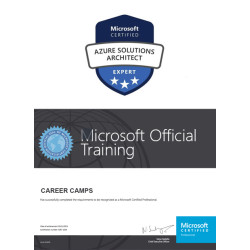
The boot camp prepares students for the Microsoft Certified: Azure Administrator Associate (AZ-104) and Microsoft Certified: Azure Solutions Architect Expert (AZ-305) certification exams. Together, these certifications demonstrate skills in administering Azure environments and designing enterprise-level Azure solutions.
Who should take this accelerated Azure certification boot camp?
This program is best suited for Azure administrators, cloud engineers, systems administrators, network engineers, DevOps professionals, cloud architects, and experienced IT professionals who want to advance their Microsoft Azure skills and certifications.
Do I need previous Azure experience to take this boot camp?
Yes. Because this is an accelerated program covering both administrator- and architect-level material, participants should have practical IT and cloud experience. Familiarity with Azure administration, networking, virtualization, operating systems, security, and cloud infrastructure is highly recommended.
Can I take both Microsoft certification exams during the boot camp?
Yes, the program is structured to allow participants to prepare for and take both the AZ-104 and AZ-305 certification exams during the 6-day training experience, assuming the exams are included in your specific enrollment package.
Is this Azure boot camp good for someone new to Azure?
Because the program covers two advanced Azure certifications in only six days, it is not intended as an introductory Azure course. Professionals who are new to Azure should generally establish foundational Azure knowledge before attempting this accelerated administrator and solutions architect program.
Related products
-

MCA Microsoft Azure Admin & MCE Solutions Architect COMBO Certification Boot Camp
$5,995.00 Course Details This product has multiple variants. The options may be chosen on the product page -
MCA Microsoft Azure Administrator and Azure Fundamentals Certification (AZ-900, AZ-104) Boot Camp
$4,495.00 Course Details This product has multiple variants. The options may be chosen on the product page -
Azure Fundamentals Certification (AZ-900) Boot Camp
$995.00 Course Details This product has multiple variants. The options may be chosen on the product page -

MCE Microsoft Azure Solutions Architect Certification (AZ-305) Boot Camp
Price range: $2,795.00 through $3,599.00 Course Details This product has multiple variants. The options may be chosen on the product page
Ready to Take the Next Step?
Choose your upcoming training date or talk with our training advisors about the right option for you or your team.