
Azure AI App & Agent Developer · AI-901 + AI-103
Earn Your Azure AI App & Agent Developer Certification in Just 5 Days
Live instructor-led training, official courseware, hands-on labs, exam vouchers, and a free retake — all in one package.
What's Included
Microsoft Certified Trainer (MCT) Instructor Led Live Training
2 Microsoft Official Courses (AI-901 / AI-103)
2 Microsoft Official Exam Vouchers (AI-901 / AI-103)
Free Retake Voucher for Each Exam
Microsoft Official Hands on Labs
Microsoft Vetted Practice Exams
Onsite & Online Pearson Vue Testing
Upcoming Sessions
MCA Azure AI App & Agent Developer Associate Certification (AI-901, AI-103) Boot Camp
Scroll to see additional dates.
Date
Location / Format
Price
PRIVATE – 1-ON-1
Ft Lauderdale, FL / Virtual
$4,495.00
Nov 9–13, 2026
Virtual 9am EST Start
$3,495.00
Nov 9–13, 2026
Ft Lauderdale, FL · Onsite
$3,495.00
Dec 14–18, 2026
Ft Lauderdale, FL · Onsite
$3,495.00
Dec 14–18, 2026
Virtual 9am EST Start
$3,495.00
Jan 11–15, 2027
Ft Lauderdale, FL · Onsite
$3,495.00
Jan 11–15, 2027
Virtual 9am EST Start
$3,495.00
Feb 1–5, 2027
Virtual 9am EST Start
$3,495.00
Feb 1–5, 2027
Ft Lauderdale, FL · Onsite
$3,495.00
Training a Team? Get a Customized Team Quote
Volume pricing available for groups and corporate training.
Upcoming Sessions
Azure AI App & Agent Developer
Course Details
MCA Azure AI App & Agent Developer Associate Certification (AI-901, AI-103) Boot Camp
Duration
5 Days
Exams Covered
AI-901 / AI-103
Delivery
Classroom Live
Remote Live
Remote Live
Included
Vouchers + Retake + Official Labs
Why Thousands Choose Career Camps
17+ Years of Training Experience
For more than 17 years, professionals and organizations have relied on our training expertise to build in-demand technology skills, prepare for industry certifications, and advance their teams.
5,000+ Professionals Trained
With 5,000+ professionals trained, we bring extensive experience supporting individuals, enterprise teams, government organizations, and military clients with technology skills and certification training.
Trusted by Professionals & Organizations
Trusted by thousands of IT professionals, businesses, government organizations, and enterprise teams for high-quality certification training and technology skills development.
Access to 10+ Training Providers
Get access to training from 10+ established certification training providers, giving you more options to find the right course, schedule, delivery format, and training solution for your certification goals.
Live Certified Instructors
Learn directly from experienced certified instructors—not prerecorded videos or self-paced material.
Official Training
Train with authorized, official courseware and curriculum from leading technology certification providers. Get the same industry-recognized training designed to prepare professionals for today’s most in-demand certifications and technology roles.
Course Description
Description
Prerequisites
Before taking this course, students should have:
Experience using computers and the internet.
Interest in use cases for AI applications and machine learning models.
A willingness to learn through hands-on exploration.
Basic understanding of programming concepts (Python or similar recommended)
Familiarity with cloud computing concepts (preferably Microsoft Azure)
General understanding of APIs and application development
Introductory knowledge of AI concepts and terminology
Experience using common development tools and environments
Why Choose Us
CAREER CAMPS DIFFERENCE
Career Camps provides an in-depth hands on learning environment. Our instructors teach using demonstrations and explain concepts beyond the scope of the courseware. The best instructors are contracted from all across the US. These professionals are real world consultants who actually implement these technologies. Career Camps knows our clients work in the “real world” and it only makes sense to have an instructor with the experience in the real world.
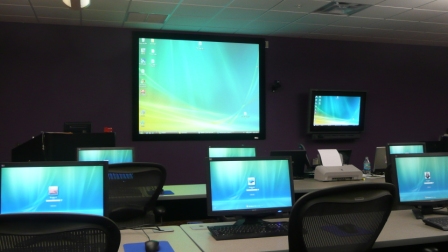 Facilities – Many of our competitors over-crowd classrooms by placing 2 to 3 students per desk and 20+ students per instructor. Often these companies “extend” the life of very old equipment with slow performance on the software used today. Our average class size is 8 students. Our facilities have the best equipment with the most comfortable, focused environment for learning.
Instructors – Our CEO holds one of the rarest Microsoft Certifications – the Microsoft Certified Learning Consultant (MCLC) Certification. This certification reflects a commitment to make sure our instructors are also actively engaged in real world consulting projects. Students expect a professional who can answer questions and demonstrate the technology.
Face to Face Training – We believe the best way to interact and learn is face to face training. Many of our competitors which offer local training are simply providing students with headphones/mic to attend class with an instructor at a remote location.
Test Pass – We offer a free retake voucher (if needed) for each of the exams required for certification. Any training center offering a “100% pass guarantee” would have to use unethical practices or unlimited test vouchers (which is not likely or practical).
Distractions – Students often look for a “local” training center so they can be close to home and work. Boot camp requires a tremendous time commitment during the program. Long class hours combined with self study each evening. The goal of boot camp is to achieve certification in a fraction of the time. We strongly recommend students attend camp away from home and work in a focused, distraction free environment.
Boot Camp – Boot camp is an accelerated training focused on teaching technology and testing students on the official exams. Most training providers “added” boot camps to the existing standard training classes they offer. These training centers think a boot camp is just a regular class where you send the student home with a voucher on the last day. Career Camps administers exams throughout the camp. Equally important – not every trainer can teach a boot camp and not all courseware is designed for boot camp format. Our trainers know the boot camp format and our courseware is designed for accelerated learning.
Florida – Career Camps has one of the most scenic locations boasting some of the best weather in US. We believe students should have a comfortable and inviting atmosphere while attending these otherwise intense programs. We place our location, facilities and amenities up against that any competitor.
Microsoft Gold Learning Partner

What You'll Learn
In this course, you will:
-
- Gain a solid foundation in AI concepts including machine learning, NLP, computer vision, and generative AI.
- Learn hands-on with Azure AI Foundry to build and test intelligent applications.
- Understand real-world applications of AI such as text analysis, speech recognition, image analysis, and information extraction.
- Explore responsible AI practices to design solutions that are ethical and trustworthy.
- Prepare for more advanced AI projects by establishing a strong base in both theory and Azure tools.
- Design and build end-to-end AI solutions using Microsoft Foundry and Azure
- Select, deploy, and evaluate AI models based on performance and use case
- Develop generative AI applications, including chat-based and tool-enabled solutions
- Optimize AI outputs using prompt engineering, RAG, and fine-tuning techniques
- Build and integrate AI agents, including multi-agent and workflow-driven solutions
- Create applications that process and generate text, speech, images, and video
- Extract insights from documents and unstructured data using AI services
- Implement responsible AI practices, including risk mitigation and governance
- Integrate AI solutions with enterprise platforms such as Microsoft 365
Course Outline
Introduction to AI concepts
- Introduction to AI
- Generative AI and agents
- Text and natural language
- Speech
- Computer vision
- Information extraction
- Responsible AI
Introduction to generative AI and agents
- Large language models (LLMs)
- Prompts
- AI agents
Introduction to natural language processing concepts
- Tokenization
- Statistical text analysis.
- Semantic language models
Introduction to AI speech concepts
- Speech-enabled solutions
- Speech recognition
- Speech synthesis
Introduction to computer vision concepts
- Computer vision tasks and techniques
- Images and image processing
- Convolutional neural networks
- Vision transformers and multimodal models
- Image generation
Introduction to AI-powered information extraction concepts
- Overview of information extraction
- Optical character recognition (OCR)
- Field extraction and mapping
Get started with AI in Azure
- Understand Azure
- Developing AI apps on Azure
- Microsoft Foundry for AI
- Using Microsoft Foundry endpoints
Get started with Generative AI and agents in Azure
- Generative AI models
- Using a generative AI model
- Creating an agent
Get started with text analysis in Azure
- Understand text analysis in Foundry
- Create a client application that analyzes text
- Use Azure Language with an agent
Get started with Speech in Azure
- Speech recognition
- Speech synthesis
- Creating a speech-capable agent
Get started with Computer vision in Azure
- Multimodal models for image analysis
- Image generation models
- Video generation models
Get started with AI-powered information extraction in Azure
- Extract information from documents
- Extract information from audio and video
Plan and prepare to develop AI solutions on Azure
- What is AI?
- Microsoft Foundry
- Foundry Tools
- Developer tools and SDKs
- Responsible AI
Select, deploy, and evaluate Microsoft Foundry models
- Explore the model catalog
- Select models using benchmarks
- Deploy models to endpoints
- Evaluate model performance
Develop a generative AI chat app with Microsoft Foundry
- Explore with the model playground
- Choose an endpoint and SDK
- Generate responses with the Responses API
- Generate responses with the ChatCompletions API
Develop generative AI apps that use tools
- What are tools?
- Use the code_interpreter tool
- Use the web_search tool
- Use the file_search tool
- Use the function tool
Optimize generative AI model performance with Microsoft Foundry
- Optimize model output with prompt engineering
- Ground your model with Retrieval Augmented Generation
- Fine-tune a model for consistent behavior
- Compare and combine optimization strategies
Implement a responsible generative AI solution in Microsoft Foundry
- Plan a responsible generative AI solution
- Map potential harms
- Measure potential harms
- Mitigate potential harms
- Manage a responsible generative AI solution
Develop AI agents with Microsoft Foundry and Visual Studio Code
- Understand AI agents and Microsoft Foundry Agent Service
- Explore development approaches
- Build your first agent in Microsoft Foundry
- Set up Visual Studio Code for agent development
- Configure and manage agents in Visual Studio Code
- Extend agent capabilities with tools
- Test, deploy, and integrate agents
Integrate custom tools into your agent
- Why use custom tools
- Options for implementing custom tools
- How to integrate custom tools
Integrate MCP Tools with Azure AI Agents
- Understand MCP tool discovery
- Integrate agent tools using an MCP server and client
- Use Azure AI agents with MCP servers
Build knowledge-enhanced AI agents with Foundry IQ
- Understanding RAG for agents
- Explore Foundry IQ
- Configure data sources for knowledge bases
- Configure retrieval with Foundry IQ
Integrate your agent with Microsoft 365
- Understand Foundry agent publishing options
- Publish an agent from Foundry portal to Teams
- Advanced – Use Microsoft 365 Agents Toolkit
- Access Microsoft 365 data with Work IQ
- Test and iterate your integrated agent
Build agent-driven workflows using Microsoft Foundry
- Understand Workflows
- Identify Workflow Patterns
- Create workflows in Microsoft Foundry
- Add Agents to a Workflow
- Apply Power Fx in Workflows
- Maintain Workflows in Microsoft Foundry
- Use workflows in code
Develop an AI agent with Microsoft Agent Framework
- Understand Microsoft Agent Framework AI agents
- Create an Azure AI agent with Microsoft Agent Framework
- Add tools to Azure AI agent
Orchestrate a multi-agent solution using the Microsoft Agent Framework
- Understand the Microsoft Agent Framework
- Understand agent orchestration
- Use concurrent orchestration
- Use sequential orchestration
- Use group chat orchestration
- Use handoff orchestration
- Use Magnetic orchestration
Discover Azure AI Agents with A2A
- Define an A2A agent
- Implement an agent executor
- Host an A2A server
- Connect to your A2A agent
Analyze text with Azure Language in Foundry Tools
- Azure Language in Microsoft Foundry Tools
- Detect language
- Extract entities
- Extract personally identifiable information (PII)
Develop a text analysis agent with the Azure Language MCP server
- Understand the Azure Language MCP server
- Connect and use the Language MCP server with an agent
Develop a speech-capable generative AI application
- Choose a speech-capable model
- Transcribe speech
- Synthesize speech
Create speech-enabled apps with Azure Speech in Microsoft Foundry Tools
- Azure Speech in Foundry Tools
- Use the Speech to Text API
- Use the Text to Speech API
- Configure audio format and voices
- Use Speech Synthesis Markup Language
Develop a speech agent with the Azure Speech MCP server
- Understand the Azure Speech MCP server
- Connect and use the Speech MCP server with an agent
Develop an Azure Speech Voice Live Agent in Microsoft Foundry
- Explore the Azure Voice Live API
- Explore the AI Voice Live client library for Python
- Create a Voice Live agent
Translate text and speech with Microsoft Foundry Tools
- Translation in Microsoft Foundry
- Translate text
- Translate speech
Develop a vision-enabled generative AI application
- Use a vision-capable model in the Microsoft Foundry portal
- Develop a vision-based chat app
Generate images with AI
- What are image-generation models?
- Explore image-generation models in Microsoft Foundry portal
- Create a client application that uses an image generation model
Generate videos with Microsoft Foundry
- Deploy a video generating model
- Generate video from a prompt
- Generate video in Python
Analyze images with content Understanding
- What is Content Understanding?
- Analyze images with Content Understanding
Create a multimodal analysis solution with Azure Content Understanding
- What is Azure Content Understanding?
- Create a Content Understanding analyzer
- Use the Content Understanding API
Create an Azure Content Understanding client application
- Prepare to use the AI Content Understanding API
- Create a Content Understanding analyzer
- Analyze content
Extract data with Azure Document Intelligence
- What is Azure Document Intelligence?
- Use the Document Intelligence Studio
- Use prebuilt models
- Train and use custom models
Create a knowledge mining solution with Azure AI Search
- What is Azure AI Search?
- Extract data with an indexer
- Enrich extracted data with AI skills
- Search an index
- Persist extracted information in a knowledge store
Frequently Asked Questions
What is the Azure AI App & Agent Developer Associate Boot Camp?
The MCA Azure AI App & Agent Developer Associate Boot Camp is an intensive Microsoft Azure AI training program designed to help developers and IT professionals build intelligent applications and AI agents using Microsoft Azure. The program combines foundational AI knowledge with practical Azure AI development skills and prepares students for the AI-901 and AI-103 certification exams.
What certifications can I earn through this Azure AI boot camp?
This boot camp is designed to prepare participants for the Microsoft Azure AI Fundamentals (AI-901) and Azure AI Apps and Agents Developer Associate (AI-103) exams. The two certifications provide a progression from foundational Azure AI concepts to more advanced AI application and agent development skills.
Do I need previous Azure or AI experience?
The AI-901 portion provides foundational AI and Azure knowledge, making it accessible to professionals who are newer to artificial intelligence. However, the AI-103 portion is more technical and is best suited for individuals with programming, software development, or Azure experience.
What is an AI agent?
An AI agent is a software system that can use AI models, tools, data, and instructions to perform tasks and respond to user requests. Azure provides tools and services that developers can use to build, deploy, and manage intelligent AI agents and applications.
What programming skills are recommended for AI-103?
Programming experience is recommended for the AI-103 portion of the course. Familiarity with application development, APIs, cloud services, and software development concepts can help participants get the most from the training.
Why should I take both AI-901 and AI-103 training?
Taking both courses provides a structured progression from foundational Azure AI knowledge to practical AI application and agent development. AI-901 establishes the fundamentals, while AI-103 builds the technical skills needed to develop and deploy AI-powered applications and agents on Azure.
Related products
-
Introduction to AI in Azure Certification (AI-901) Boot Camp
Price range: $795.00 through $995.00 Course Details This product has multiple variants. The options may be chosen on the product page -
MCA Azure AI Cloud Developer Certification (AI-200) Boot Camp
Price range: $3,195.00 through $3,795.00 Course Details This product has multiple variants. The options may be chosen on the product page -
MCA Microsoft SQL AI Developer Associate Certification (DP-900, DP-800) Boot Camp
Price range: $2,995.00 through $3,495.00 Course Details This product has multiple variants. The options may be chosen on the product page -
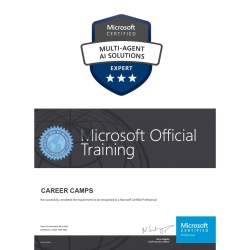
MCE Multi-Agent AI Solutions Certification (AI-500) Boot Camp
Price range: $2,695.00 through $3,495.00 Course Details This product has multiple variants. The options may be chosen on the product page
Ready to Take the Next Step?
Choose your upcoming training date or talk with our training advisors about the right option for you or your team.