WHAT IS INCLUDED
 |
Airfare to/from Sarasota, FL |
 |
5 Nights of Lodging |
 |
Ground Transportation |
 |
Microsoft Training Books |
 |
2 Microsoft Exam Vouchers |
 |
1 Retake Voucher (if needed) |
 |
Onsite Pearson Vue Test Center |
 |
Microsoft Study Labs & Simulations |
LOCATIONS
Our primary Microsoft Training campus for individual students is based in Sarasota, FL, but we make it easy to join us from anywhere. By attending our live virtual classes from your home or office, you can eliminate the costs of airfare, lodging, and travel. If you don’t see a specific course or location listed, please contact us; we offer hundreds of classes across the U.S. and provide competitive corporate and group rates. For groups of five or more, we can even bring the training directly to your facility. Whether you are pursuing Microsoft Azure or Microsoft 365 certifications, our extensive partnerships ensure we have a solution that fits your needs.
- Description
- Additional information
- Our Facilities
- Why Choose Us
- Microsoft Gold Learning Partner
- Microsoft Azure Certifications
Description
Additional information
| Class Dates | 08/10/2026 – 08/14/2026 – Sarasota, FL, 09/14/2026 – 09/18/2026 – Sarasota, FL, 10/05/2026 – 10/09/2026 – Sarasota, FL, 11/02/2026 – 11/06/2026 – Sarasota, FL |
|---|
Our Facilities
CAREER CAMPS FACILITIES
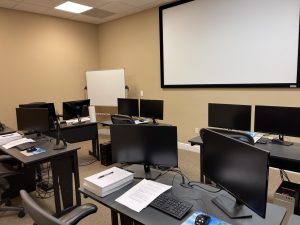 CAMPUS – Career Camps built out a stand alone training center (not a hotel conference room) with spacious classrooms, new desk, Herman Miller Aeron chairs & comfortable common areas. Each student has a dedicated desk with two monitors. Each classroom has a maximum of two rows – so everyone is able to be engaged without the “back row” feeling.
CLASSROOM EQUIPMENT – Students work on a dedicated Dell Client Desktop with 32GB memory with 512GB SSD drives – All Labs are executed the extremely fast Microsoft Data Center Hosted Lab Environment.
CAMPUS INTERNET – The campus is connected with a 1Gbps (1,000 Mbps) Verizon Fios Business Connection which provides complete internet (including VPN) access for students.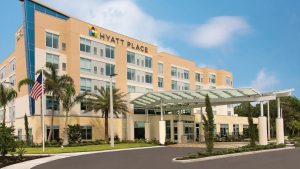
COMMON AREA – Amenities including snacks, drinks (Coffee, 100% juices, sodas, etc) all complimentary.
LODGING – We use the Hyatt Place Lakewood Ranch. This “upgraded” hotel offers extremely comfortable beds, great breakfast and very fast internet access.
NEAR BY AMENITIES – Many shops, restaurants and grocery options are available within walking distance. Additionally – the hotel provided scheduled shuttle services. Restaurants like Bone Fish Grill, Ruby Tuesday’s, Five Guys, Chipotle, Quiznos, Chili’s and over 20 additional choices in the immediate area. All of these options are offered in a pedestrian walking village.
Why Choose Us
CAREER CAMPS DIFFERENCE
Career Camps provides an in-depth hands on learning environment. Our instructors teach using demonstrations and explain concepts beyond the scope of the courseware. The best instructors are contracted from all across the US. These professionals are real world consultants who actually implement these technologies. Career Camps knows our clients work in the “real world” and it only makes sense to have an instructor with the experience in the real world.
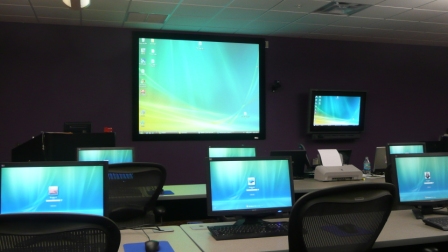 Facilities – Many of our competitors over-crowd classrooms by placing 2 to 3 students per desk and 20+ students per instructor. Often these companies “extend” the life of very old equipment with slow performance on the software used today. Our average class size is 8 students. Our facilities have the best equipment with the most comfortable, focused environment for learning.
Instructors – Our CEO, Chester Flake holds one of the rarest Microsoft Certifications – the Microsoft Certified Learning Consultant (MCLC) Certification. This certification reflects a commitment to make sure our instructors are also actively engaged in real world consulting projects. Students expect a professional who can answer questions and demonstrate the technology.
Face to Face Training – We believe the best way to interact and learn is face to face training. Many of our competitors which offer local training are simply providing students with headphones/mic to attend class with an instructor at a remote location.
Test Pass – We offer a free retake voucher (if needed) for each of the exams required for certification. Any training center offering a “100% pass guarantee” would have to use unethical practices or unlimited test vouchers (which is not likely or practical).
Distractions – Students often look for a “local” training center so they can be close to home and work. Boot camp requires a tremendous time commitment during the program. Long class hours combined with self study each evening. The goal of boot camp is to achieve certification in a fraction of the time. We strongly recommend students attend camp away from home and work in a focused, distraction free environment.
Boot Camp – Boot camp is an accelerated training focused on teaching technology and testing students on the official exams. Most training providers “added” boot camps to the existing standard training classes they offer. These training centers think a boot camp is just a regular class where you send the student home with a voucher on the last day. Career Camps administers exams throughout the camp. Equally important – not every trainer can teach a boot camp and not all courseware is designed for boot camp format. Our trainers know the boot camp format and our courseware is designed for accelerated learning.
Florida – Career Camps has one of the most scenic locations boasting some of the best weather in US. We believe students should have a comfortable and inviting atmosphere while attending these otherwise intense programs. We place our location, facilities and amenities up against that any competitor.
Microsoft Gold Learning Partner

Microsoft Azure Certifications
Microsoft Job Role-based Azure Certifications
Microsoft has aligned Azure certifications and training to job roles – focusing on Admin, Dev or Architect.
Each certification requires 2 exams and no certification has any prerequisite certification requirements.

Related products
-


Introduction to AI in Azure Certification (AI-900) Boot Camp
$995.00 Select options This product has multiple variants. The options may be chosen on the product page -
Microsoft Cloud and AI Security Engineer Associate Certification (SC-900, SC-500) Boot Camp
$3,795.00 Select options This product has multiple variants. The options may be chosen on the product page -
MCA Microsoft Azure Admin & MCE Solutions Architect Accelerated Certification Boot Camp
$4,995.00 Select options This product has multiple variants. The options may be chosen on the product page -
MCA Microsoft Azure Administrator and Azure Fundamentals Certification (AZ-900, AZ-104) Boot Camp
$4,495.00 Select options This product has multiple variants. The options may be chosen on the product page