
Microsoft Azure Database Administrator · DP-300
Pass the Microsoft Azure Database Administrator Certification in Just 4 Days
Live instructor-led training, official courseware, hands-on labs, exam voucher, and a free retake — all in one package.
What's Included
Microsoft Certified Trainer (MCT) Instructor Led Live Training
1 Microsoft Official Courses (DP-300)
1 Microsoft Exam Vouchers (DP-300)
Free Retake Voucher for Each Exam
Microsoft Official Hands on Labs
Microsoft Vetted Practice Exams
Onsite & Online Pearson Vue Testing
Upcoming Sessions
MCA Microsoft Azure Database Administrator Certification (DP-300) Boot Camp
Scroll to see additional dates.
Date
Location / Format
Price
Oct 19–22, 2026
Ft Lauderdale, FL · Onsite
$2,795.00
Oct 19–22, 2026
Virtual 9am EST Start
$2,795.00
Nov 9–12, 2026
Ft Lauderdale, FL · Onsite
$2,795.00
Nov 9–12, 2026
Virtual 9am EST Start
$2,795.00
Nov 30 – Dec 3, 2026
Ft Lauderdale, FL · Onsite
$2,795.00
Nov 30 – Dec 3, 2026
Virtual 9am EST Start
$2,795.00
Dec 14–17, 2026
Ft Lauderdale, FL · Onsite
$2,795.00
Dec 14–17, 2026
Virtual 9am EST Start
$2,795.00
PRIVATE – 1-ON-1
Ft Lauderdale, FL / Virtual
$3,595.00
Training a Team? Get a Customized Team Quote
Volume pricing available for groups and corporate training.
Upcoming Sessions
Microsoft Azure Database Administrator
Course Details
MCA Microsoft Azure Database Administrator Certification (DP-300) Boot Camp
Duration
4 Days
Exams Covered
DP-300
Delivery
Classroom Live
Remote Live
Remote Live
Included
Vouchers + Retake + Official Labs
Why Thousands Choose Career Camps
17+ Years of Training Experience
For more than 17 years, professionals and organizations have relied on our training expertise to build in-demand technology skills, prepare for industry certifications, and advance their teams.
5,000+ Professionals Trained
With 5,000+ professionals trained, we bring extensive experience supporting individuals, enterprise teams, government organizations, and military clients with technology skills and certification training.
Trusted by Professionals & Organizations
Trusted by thousands of IT professionals, businesses, government organizations, and enterprise teams for high-quality certification training and technology skills development.
Access to 10+ Training Providers
Get access to training from 10+ established certification training providers, giving you more options to find the right course, schedule, delivery format, and training solution for your certification goals.
Live Certified Instructors
Learn directly from experienced certified instructors—not prerecorded videos or self-paced material.
Official Training
Train with authorized, official courseware and curriculum from leading technology certification providers. Get the same industry-recognized training designed to prepare professionals for today’s most in-demand certifications and technology roles.
Course Description
- Description
- Prerequisites
- Our Facilities
- Why Choose Us
- Microsoft Gold Learning Partner
- What You'll Learn
Description
Prerequisites
Successful Azure Database Administrators start this role with professional experience in database management and technical knowledge of cloud technologies. Specifically:
Working with, maintaining, and developing with SQL Server
Experience with Azure, such as deploying and managing resources
At a minimum, you should know the information in the following courses before attending the course:
Introduction to Cloud Infrastructure (AZ-900)
Microsoft Azure Data Fundamentals Training (DP-900)
Our Facilities
CAREER CAMPS FACILITIES
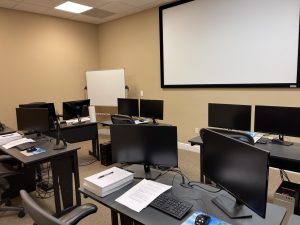 CAMPUS – Career Camps built out a stand alone training center (not a hotel conference room) with spacious classrooms, new desk, Herman Miller Aeron chairs & comfortable common areas. Each student has a dedicated desk with two monitors. Each classroom has a maximum of two rows – so everyone is able to be engaged without the “back row” feeling.
CLASSROOM EQUIPMENT – Students work on a dedicated Dell Client Desktop with 32GB memory with 512GB SSD drives – All Labs are executed the extremely fast Microsoft Data Center Hosted Lab Environment.
CAMPUS INTERNET – The campus is connected with a 1Gbps (1,000 Mbps) Verizon Fios Business Connection which provides complete internet (including VPN) access for students.
COMMON AREA – Amenities including snacks, drinks (Coffee, 100% juices, sodas, etc) all complimentary.
LODGING – We use the Hyatt Place Lakewood Ranch. This “upgraded” hotel offers extremely comfortable beds, great breakfast and very fast internet access.
NEAR BY AMENITIES – Many shops, restaurants and grocery options are available within walking distance. Additionally – the hotel provided scheduled shuttle services. Restaurants like Bone Fish Grill, Ruby Tuesday’s, Five Guys, Chipotle, Quiznos, Chili’s and over 20 additional choices in the immediate area. All of these options are offered in a pedestrian walking village.
Why Choose Us
CAREER CAMPS DIFFERENCE
Career Camps provides an in-depth hands on learning environment. Our instructors teach using demonstrations and explain concepts beyond the scope of the courseware. The best instructors are contracted from all across the US. These professionals are real world consultants who actually implement these technologies. Career Camps knows our clients work in the “real world” and it only makes sense to have an instructor with the experience in the real world.
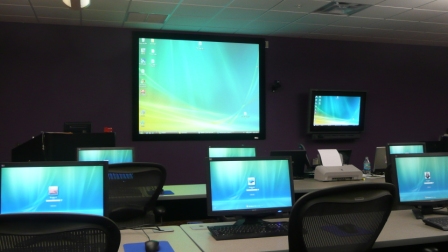 Facilities – Many of our competitors over-crowd classrooms by placing 2 to 3 students per desk and 20+ students per instructor. Often these companies “extend” the life of very old equipment with slow performance on the software used today. Our average class size is 8 students. Our facilities have the best equipment with the most comfortable, focused environment for learning.
Instructors – Our CEO holds one of the rarest Microsoft Certifications – the Microsoft Certified Learning Consultant (MCLC) Certification. This certification reflects a commitment to make sure our instructors are also actively engaged in real world consulting projects. Students expect a professional who can answer questions and demonstrate the technology.
Face to Face Training – We believe the best way to interact and learn is face to face training. Many of our competitors which offer local training are simply providing students with headphones/mic to attend class with an instructor at a remote location.
Test Pass – We offer a free retake voucher (if needed) for each of the exams required for certification. Any training center offering a “100% pass guarantee” would have to use unethical practices or unlimited test vouchers (which is not likely or practical).
Distractions – Students often look for a “local” training center so they can be close to home and work. Boot camp requires a tremendous time commitment during the program. Long class hours combined with self study each evening. The goal of boot camp is to achieve certification in a fraction of the time. We strongly recommend students attend camp away from home and work in a focused, distraction free environment.
Boot Camp – Boot camp is an accelerated training focused on teaching technology and testing students on the official exams. Most training providers “added” boot camps to the existing standard training classes they offer. These training centers think a boot camp is just a regular class where you send the student home with a voucher on the last day. Career Camps administers exams throughout the camp. Equally important – not every trainer can teach a boot camp and not all courseware is designed for boot camp format. Our trainers know the boot camp format and our courseware is designed for accelerated learning.
Florida – Career Camps has one of the most scenic locations boasting some of the best weather in US. We believe students should have a comfortable and inviting atmosphere while attending these otherwise intense programs. We place our location, facilities and amenities up against that any competitor.
Microsoft Gold Learning Partner

What You'll Learn
- Describe core data concepts in Azure
- Explain concepts of relational data in Azure
- Explain concepts of non-relational data in Azure
- Identify components of a modern data warehouse in Azure
- Plan, deploy and configure Azure SQL offerings
- Monitor database performance and tune a database and queries for optimum performance
- Plan and configure a High Availability Solution
Course Outline
Prepare to maintain SQL Server-based databases on Azure
- Understand the role of Azure Database Administrator as it fits in with other data platform roles.
- Describe the key differences between the SQL Server-based database options in Azure.
- Describe other features for Azure SQL platforms available.
Deploy IaaS solutions with Azure SQL
- Explore the basics of SQL Server in an Infrastructure as a Service (IaaS) offering
- Learn the available options for provisioning and deployment
- Deploy SQL Server into an Azure Virtual Machine
Deploy PaaS solutions with Azure SQL
- Gain an understanding SQL Server in a Platform as a Service (PaaS) offering
- Understand PaaS provisioning and deployment options
- Understand elastic pools
- Examine Azure SQL Managed Instances
- Configure a template for PaaS deployment
Migrate SQL Server workloads to Azure SQL Database
- Explore the advantages, capabilities, and migration possibilities offered by Azure SQL Database.
- Migrate databases using Azure SQL Migration extension for Azure Data Studio and tracking database migration activities.
- Use transactional replication as an online method to migrate to Azure SQL Database.
- Explore several other methods for migrating SQL Server databases to Azure SQL Database.
Migrate SQL Server workloads to Azure SQL Managed Instance
- Explore the advantages, capabilities, and migration possibilities offered by Azure SQL Managed Instance.
- Learn how Log Replay Service works to migrate to Azure SQL Managed Instance.
- Understand how Managed Instance link feature works in a migration scenario.
- Load and move data to and from Azure SQL Managed Instance.
- Explore several other methods for migrating SQL Server databases to Azure SQL Database.
Configure database authentication and authorization
- Learn about authentication options for Azure SQL
- Create various security principals
- Configure permissions within a SQL database
- Identify authentication and authorization failures
Protect data in-transit and at rest
- Understand the data encryption options available in the various platforms
- Implement object level encryption
- Understand the difference between database and server firewall rules for Azure SQL Database
- Explore Always Encrypted with secure enclaves
Implement compliance controls for sensitive data
- Plan and implement data classification in Azure SQL Database
- Understand and configure row-level security and dynamic data masking
- Understand the usage of Microsoft Defender for SQL
- Explore how Ledger works
Describe performance monitoring
- Review potential performance issues.
- Identify critical Azure metrics.
- Learn how to collect metrics for an established baseline.
- Use extended events for performance analysis.
- Understand database watcher for Azure SQL Database and Azure SQL Managed Instance.
Configure SQL Server resources for optimal performance
- Understand your options for configuration of Azure storage
- Learn how to configure TempDB data files in SQL Server
- Learn how to choose the right type of VM for SQL Server workloads
- Understand the use cases and configuration of Resource Governor in SQL Server
Configure databases for optimal performance
- Understand database scoped configuration options
- Understand maintenance tasks related to indexing and statistics
- Understand the features of Intelligent Query Processing (IQP)
- Explore the automatic tuning feature in Azure
Explore query performance optimization
- Generate and save execution plans
- Compare the different types of execution plans
- Understand how and why query plans are generated
- Explain the purpose and benefits of the Query Store
- Investigate the available reports and data in the Query Store
Explore performance-based database design
- Explore normal forms and how they affect database design
- Choose appropriate datatypes for your data
- Evaluate appropriate index types
Evaluate performance improvements
- Determine when changing indexes or defining new ones can affect performance
- Evaluate wait statistics as an aid in finding areas for performance improvement
- Understand how query hints work, and when to use them
Automate database deployment
- Describe the deployment models available on Azure
- Deploy database resources using PowerShell and Azure CLI
- Deploy an Azure Resource Manager template and Bicep
- Understand the difference between multiple command-line options
Create and manage SQL Agent jobs
- Schedule necessary maintenance activities for your databases.
- Configure notifications and alerts on SQL Server Agent jobs, and SQL Server.
- Configure alerts based on performance monitor values.
Manage Azure PaaS tasks using automation
- Understand the benefits of Azure policy
- Explore the capabilities of Azure Automation
- Configure elastic jobs
- Use Logic Apps for database workflow
Plan and implement a high availability and disaster recovery environment
- Describe High Availability and Disaster Recovery Strategies
- Describe recovery time objective (RTO) and recovery point objective (RPO)
- Explore high availability and disaster recovery options
- Describe Azure high availability and disaster recovery features for Virtual Machines
- Describe high availability and disaster recovery for PaaS deployments
- Explore high availability and disaster recovery solutions for IaaS
- Describe hybrid solutions
Explore IaaS and PaaS Solutions for High Availability and Disaster Recovery
- Describe failover clusters in Windows Server
- Configure Always On Availability Groups
- Describe active geo-replication for Azure SQL Database
- Explore auto-failover groups for Azure SQL Database and Azure SQL Managed Instance
- Monitor availability
- Exercise: Configure geo-replication for Azure SQL Database
Back Up and Restore Databases
- Back up and restore SQL Server running on Azure virtual machines
- Back up a SQL Server virtual machine
- Back up and restore a database for SQL Database and SQL Managed Instance
- Exercise: Backup to URL
Frequently Asked Questions
What is the Microsoft Azure Database Administrator Boot Camp?
The Microsoft Azure Database Administrator (DP-300) Boot Camp is an intensive, instructor-led training program focused on Administering Microsoft Azure SQL Solutions. Students develop practical skills to configure, manage, secure, monitor, and optimize Azure SQL database environments while preparing for the DP-300 certification exam.
What certifications does this boot camp prepare me for?
This boot camp prepares students for the DP-300: Administering Microsoft Azure SQL Solutions certification exam, which is required for the Microsoft Certified: Azure Database Administrator Associate certification.
Who should attend Azure Database Administrator training?
This boot camp is ideal for Azure Database Administrators, SQL Database Administrators, database professionals, SQL Server administrators, cloud engineers, systems administrators, IT professionals, and data professionals who want to build or expand their Azure database administration skills.
Do I need previous database experience?
Previous database experience is helpful but not necessarily required for the DP-900 fundamentals portion. For the accelerated DP-300 training, students will benefit from having experience with SQL Server, relational databases, database administration, or general IT infrastructure.
Does the Azure Database Administrator Boot Camp include hands-on training?
Yes. The boot camp is designed as live, instructor-led training with practical exercises and real-world database administration scenarios. Students can gain experience working with Azure database services, security, monitoring, performance, backup, and troubleshooting.
Do I need programming experience for DP-300?
Familiarity with SQL, relational databases, database concepts, or database administration is highly beneficial, particularly for the DP-300.
Related products
-


MCA Microsoft Power BI Data Analyst Certification (PL-900, PL-300) Boot Camp
Price range: $3,295.00 through $3,895.00 Course Details This product has multiple variants. The options may be chosen on the product page -
MCA Microsoft Fabric Analytics Engineer Certification (DP-900, DP-600) Boot Camp
$3,495.00 Course Details This product has multiple variants. The options may be chosen on the product page -
MCA Azure AI App & Agent Developer Associate Certification (AI-901, AI-103) Boot Camp
Price range: $3,495.00 through $4,495.00 Course Details This product has multiple variants. The options may be chosen on the product page

Ready to Take the Next Step?
Choose your upcoming training date or talk with our training advisors about the right option for you or your team.