
Microsoft Teams Administrator · MS-700
Earn the Microsoft Teams Administrator Certification in Just 4 Days
Live instructor-led training, official courseware, hands-on labs, exam vouchers, and a free retake — all in one package.
What's Included
Microsoft Certified Trainer (MCT) Instructor Led Live Training
1 Microsoft Official Course (MS-700)
1 Microsoft Exam Voucher (MS-700)
Free Retake Voucher for Each Exam
Microsoft Official Hands on Labs
Microsoft Vetted Practice Exams
Onsite & Online Pearson Vue Testing
Upcoming Sessions
MCA Microsoft Teams Administrator Certification (MS-700) Boot Camp
Scroll to see additional dates.
Date
Location / Format
Price
PRIVATE – 1-ON-1
Ft Lauderdale, FL / Virtual
$3,595.00
Oct 19–22, 2026
Ft Lauderdale, FL, · Onsite
$2,895.00
Oct 19–22, 2026
Virtual 9am EST Start
$2,895.00
Nov 9–12, 2026
Ft Lauderdale, FL · Onsite
$2,895.00
Nov 9–12, 2026
Virtual 9am EST Start
$2,895.00
Nov 30 – Dec 3, 2026
Ft Lauderdale, FL · Onsite
$2,895.00
Nov 30 – Dec 3, 2026
Virtual 9am EST Start
$2,895.00
Dec 14–17, 2026
Ft Lauderdale, FL · Onsite
$2,895.00
Dec 14–17, 2026
Virtual 9am EST Start
$2,895.00
Jan 11–14, 2027
Ft Lauderdale, FL · Onsite
$2,895.00
Jan 11–14, 2027
Virtual 9am EST Start
$2,895.00
Training a Team? Get a Customized Team Quote
Volume pricing available for groups and corporate training.
Upcoming Sessions
Microsoft Teams Administrator
Course Details
MCA Microsoft Teams Administrator Certification (MS-700) Boot Camp
Duration
4 Days
Exams Covered
MS-700
Delivery
Remote Live
Included
Vouchers + Retake + Official Labs
Why Thousands Choose Career Camps
17+ Years of Training Experience
For more than 17 years, professionals and organizations have relied on our training expertise to build in-demand technology skills, prepare for industry certifications, and advance their teams.
5,000+ Professionals Trained
With 5,000+ professionals trained, we bring extensive experience supporting individuals, enterprise teams, government organizations, and military clients with technology skills and certification training.
Trusted by Professionals & Organizations
Trusted by thousands of IT professionals, businesses, government organizations, and enterprise teams for high-quality certification training and technology skills development.
Access to 10+ Training Providers
Get access to training from 10+ established certification training providers, giving you more options to find the right course, schedule, delivery format, and training solution for your certification goals.
Live Certified Instructors
Learn directly from experienced certified instructors—not prerecorded videos or self-paced material.
Official Training
Train with authorized, official courseware and curriculum from leading technology certification providers. Get the same industry-recognized training designed to prepare professionals for today’s most in-demand certifications and technology roles.
Course Description
Description
Prerequisites
Before attempting MS-700, attendees should have:
A proficient understanding of basic functional experience with Microsoft 365 services.
A proficient understanding of general IT practices, including using PowerShell.
Why Choose Us
CAREER CAMPS DIFFERENCE
Career Camps provides an in-depth hands on learning environment. Our instructors teach using demonstrations and explain concepts beyond the scope of the courseware. The best instructors are contracted from all across the US. These professionals are real world consultants who actually implement these technologies. Career Camps knows our clients work in the “real world” and it only makes sense to have an instructor with the experience in the real world.
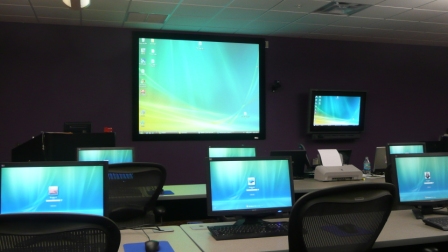 Facilities – Many of our competitors over-crowd classrooms by placing 2 to 3 students per desk and 20+ students per instructor. Often these companies “extend” the life of very old equipment with slow performance on the software used today. Our average class size is 8 students. Our facilities have the best equipment with the most comfortable, focused environment for learning.
Instructors – Our CEO holds one of the rarest Microsoft Certifications – the Microsoft Certified Learning Consultant (MCLC) Certification. This certification reflects a commitment to make sure our instructors are also actively engaged in real world consulting projects. Students expect a professional who can answer questions and demonstrate the technology.
Face to Face Training – We believe the best way to interact and learn is face to face training. Many of our competitors which offer local training are simply providing students with headphones/mic to attend class with an instructor at a remote location.
Test Pass – We offer a free retake voucher (if needed) for each of the exams required for certification. Any training center offering a “100% pass guarantee” would have to use unethical practices or unlimited test vouchers (which is not likely or practical).
Distractions – Students often look for a “local” training center so they can be close to home and work. Boot camp requires a tremendous time commitment during the program. Long class hours combined with self study each evening. The goal of boot camp is to achieve certification in a fraction of the time. We strongly recommend students attend camp away from home and work in a focused, distraction free environment.
Boot Camp – Boot camp is an accelerated training focused on teaching technology and testing students on the official exams. Most training providers “added” boot camps to the existing standard training classes they offer. These training centers think a boot camp is just a regular class where you send the student home with a voucher on the last day. Career Camps administers exams throughout the camp. Equally important – not every trainer can teach a boot camp and not all courseware is designed for boot camp format. Our trainers know the boot camp format and our courseware is designed for accelerated learning.
Florida – Career Camps has one of the most scenic locations boasting some of the best weather in US. We believe students should have a comfortable and inviting atmosphere while attending these otherwise intense programs. We place our location, facilities and amenities up against that any competitor.
What You'll Learn
- Plan and Configure a Microsoft Teams Environment
- Plan and configure network settings for Microsoft Teams
- Implement Governance and Lifecycle Management for Microsoft Teams
- Configure and manage guest access
- Manage security and compliance
- Deploy and manage Microsoft Teams endpoints
- Monitor and analyze service usage
- Manage Chat, Calling, and Meetings
Course Outline
Microsoft Teams Overview
- In Microsoft Teams overview, you will get an overview of Microsoft Teams including Teams architecture and related Office 365 workloads. You will be provided an overview of security and compliance in Microsoft Teams and finally get an overview of how to manage Microsoft Teams.
- Overview of Microsoft Teams
- Overview of security and compliance in Microsoft Teams
- Overview of managing Microsoft Teams
- Lab : Manage roles and create teams
- Prepare team roles and licenses
- Create new team
Implement Microsoft Teams Governance, Security and Compliance
- In implementing governance, security and compliance for Microsoft Teams, you will plan and configure governance for Office 365 groups including expiration and naming policies. Then you will implement security by configuring conditional access, MFA or Threat Management for Microsoft Teams. Finally, you will implement compliance for Teams by using DLP policies, eDiscovery cases or supervision policies.
- Implement Governance and Lifecycle Management for Microsoft Teams
- Implementing Security for Microsoft Teams
- Implementing Compliance for Microsoft Teams
- Lab : Configure Security and Compliance for teams and content
- Implement Governance and Lifecycle Management for Microsoft Teams
- Implementing security for Microsoft Teams
- Implementing compliance for Microsoft Teams
Prepare the environment for a Microsoft Teams deployment
- In preparing the environment for a Microsoft Teams deployment, you plan an upgrade from Skype for Business to Microsoft Teams by evaluating upgrade paths with coexistence and upgrade modes, manage meeting migrations and configuring coexistence and upgrade settings. Then you plan and configure network settings for Microsoft Teams, and finally you will deploy and manage Microsoft Teams endpoints.
- Upgrade from Skype for Business to Microsoft Teams
- Plan and configure network settings for Microsoft Teams
- Deploy and Manage Microsoft Teams endpoints
- Lab : Environment preparation for Teams
- Calculate networking capabilities
- Evaluate configuration profiles
- Provide team resources
Deploy and manage teams
- In deploying and managing teams, you will learn how to create and manage teams, manage membership and access for both, internal and external users.
- Create and manage teams
- Manage membership
- Manage access for external users
- Lab : Manage teams
- Manage team resources
- Manage sharing and access
Manage collaboration in Microsoft Teams
- In managing collaboration in Microsoft Teams, you will manage chat and collaboration experiences such as team settings or private channel creation policies. Finally, you will manage settings for Teams apps such as app setup policies, Apps, bots & connectors in Microsoft Teams or publish a custom app in Microsoft Teams.
- Manage chat and collaboration experiences
- Manage settings for Teams apps
- Lab : Modify collaboration settings for Teams
- Configure channel and message policies
- Manage app settings for team
Manage communication in Microsoft Teams
- This course concludes with managing communication in Microsoft Teams. You will learn how to manage Live event and meetings experiences, manage phone numbers or Phone System for Microsoft Teams and finally how to troubleshoot audio, video, and client issues.
- Manage Live event and meetings experiences
- Manage phone numbers
- Manage Phone System for Microsoft Teams
- Troubleshot audio, video, and client issues
- Lab : Modify communication settings for Teams
- Configure meeting policies
- Manage Phone System for Microsoft Teams
- Troubleshooting audio, video and client issues
Frequently Asked Questions
What is the Microsoft Teams Administrator (MS-700) Boot Camp?
The MCA Microsoft Teams Administrator Certification (MS-700) Boot Camp is an intensive, instructor-led training program designed to teach IT professionals how to plan, configure, manage, secure, and troubleshoot Microsoft Teams in a Microsoft 365 environment.
Who should take Microsoft Teams Administrator training?
This course is ideal for Microsoft 365 administrators, Teams administrators, collaboration administrators, systems administrators, cloud administrators, IT support professionals, and IT professionals responsible for managing Microsoft Teams.
Is the MS-700 certification difficult?
MS-700 is a role-based certification that requires an understanding of Microsoft Teams administration and Microsoft 365 collaboration technologies. Hands-on experience managing Teams, users, policies, meetings, calling, and apps can be very helpful when preparing for the exam.
Is MS-700 good for beginners?
The course is best suited for IT professionals with some familiarity with Microsoft Teams and Microsoft 365. Individuals completely new to Microsoft 365 administration may benefit from foundational Microsoft 365 training before taking an accelerated MS-700 boot camp.
Do I need previous Microsoft Teams experience?
Some experience with Microsoft Teams and Microsoft 365 is recommended. Students should have a basic understanding of Microsoft 365 services, identity and access management, networking, and general IT administration.
What will I learn in MS-700 training?
Students learn how to plan, configure, deploy, manage, and troubleshoot Microsoft Teams. Training covers Teams users, teams and channels, chat, meetings, calling, applications, policies, security, and Microsoft 365 integration.
Related products
-
MCE Microsoft 365 Administrator Expert Certification (MS-102) Boot Camp
Price range: $3,195.00 through $4,095.00 Course Details This product has multiple variants. The options may be chosen on the product page -
MCA Microsoft 365 Endpoint Administrator Associate Certification (AB-900, MD-102) Boot Camp
Price range: $3,995.00 through $5,195.00 Course Details This product has multiple variants. The options may be chosen on the product page -
MCA Microsoft Azure Administrator and Azure Fundamentals Certification (AZ-900, AZ-104) Boot Camp
Price range: $3,695.00 through $4,795.00 Course Details This product has multiple variants. The options may be chosen on the product page
Ready to Take the Next Step?
Choose your upcoming training date or talk with our training advisors about the right option for you or your team.