
Microsoft 365 Administrator Expert · MS-102
Become Microsoft 365 Administrator Expert Certified in Just 5 Days
Live instructor-led training, official courseware, hands-on labs, exam vouchers, and a free retake — all in one package.
What's Included
Microsoft Certified Trainer (MCT) Instructor Led Live Training
Microsoft Official Course (MS-102)
Microsoft Official Exam Vouchers (MS-102)
Free Retake Voucher for Each Exam
Microsoft Official Hands on Labs
Microsoft Vetted Practice Exams
Onsite & Online Pearson Vue Testing
Upcoming Sessions
MCE Microsoft 365 Administrator Expert Certification (MS-102) Boot Camp
Scroll to see additional dates.
Date
Location / Format
Price
Aug 31 – Sep 4, 2026
Sarasota Fl · Onsite
$2,995.00
Sep 14–18, 2026
Sarasota, FL · Onsite
$2,995.00
Oct 5–9, 2026
Sarasota, FL · Onsite
$2,995.00
Oct 19–23, 2026
Sarasota, FL · Onsite
$2,995.00
Nov 16–20, 2026
Sarasota, FL · Onsite
$2,995.00
Training a team? Get a customized Team Quote
Volume pricing available for groups and corporate training.
Upcoming Sessions
Microsoft 365 Administrator Expert
Course Details
MCE Microsoft 365 Administrator Expert Certification (MS-102) Boot Camp
Duration
5 Days
Exams Covered
MS-102
Delivery
Classroom Live
Remote Live
Remote Live
Included
Vouchers + Retake + Official Labs
Why Thousands Choose Career Camps
17+ Years of Training Experience
For more than 17 years, professionals and organizations have relied on our training expertise to build in-demand technology skills, prepare for industry certifications, and advance their teams.
5,000+ Professionals Trained
With 5,000+ professionals trained, we bring extensive experience supporting individuals, enterprise teams, government organizations, and military clients with technology skills and certification training.
Trusted by Professionals & Organizations
Trusted by thousands of IT professionals, businesses, government organizations, and enterprise teams for high-quality certification training and technology skills development.
Access to 10+ Training Providers
Get access to training from 10+ established certification training providers, giving you more options to find the right course, schedule, delivery format, and training solution for your certification goals.
Live Certified Instructors
Learn directly from experienced certified instructors—not prerecorded videos or self-paced material.
Official Training
Train with authorized, official courseware and curriculum from leading technology certification providers. Get the same industry-recognized training designed to prepare professionals for today’s most in-demand certifications and technology roles.
Course Description
Description
Prerequisites
Before attending this course, students must have:
Completed a role-based administrator course such as Messaging, Teamwork, Security and Compliance, or Collaboration.
A proficient understanding of DNS and basic functional experience with Microsoft 365 services.
A proficient understanding of general IT practices.
Working knowledge of PowerShell.
Attend MD-102: Microsoft 365 Endpoint Administrator – or equivalent experience and knowledge.
Our Facilities
CAREER CAMPS FACILITIES
 CAMPUS – Career Camps built out a stand alone training center (not a hotel conference room) with spacious classrooms, new desk, Herman Miller Aeron chairs & comfortable common areas. Each student has a dedicated desk with two monitors. Each classroom has a maximum of two rows – so everyone is able to be engaged without the “back row” feeling.
CLASSROOM EQUIPMENT – Students work on a dedicated Dell Client Desktop with 32GB memory with 512GB SSD drives – All Labs are executed the extremely fast Microsoft Data Center Hosted Lab Environment.
CAMPUS INTERNET – The campus is connected with a 1Gbps (1,000 Mbps) Verizon Fios Business Connection which provides complete internet (including VPN) access for students.
COMMON AREA – Amenities including snacks, drinks (Coffee, 100% juices, sodas, etc) all complimentary.
LODGING – We use the Hyatt Place Lakewood Ranch. This “upgraded” hotel offers extremely comfortable beds, great breakfast and very fast internet access.
NEAR BY AMENITIES – Many shops, restaurants and grocery options are available within walking distance. Additionally – the hotel provided scheduled shuttle services. Restaurants like Bone Fish Grill, Ruby Tuesday’s, Five Guys, Chipotle, Quiznos, Chili’s and over 20 additional choices in the immediate area. All of these options are offered in a pedestrian walking village.
Why Choose Us
CAREER CAMPS DIFFERENCE
Career Camps provides an in-depth hands on learning environment. Our instructors teach using demonstrations and explain concepts beyond the scope of the courseware. The best instructors are contracted from all across the US. These professionals are real world consultants who actually implement these technologies. Career Camps knows our clients work in the “real world” and it only makes sense to have an instructor with the experience in the real world.
 Facilities – Many of our competitors over-crowd classrooms by placing 2 to 3 students per desk and 20+ students per instructor. Often these companies “extend” the life of very old equipment with slow performance on the software used today. Our average class size is 8 students. Our facilities have the best equipment with the most comfortable, focused environment for learning.
Instructors – Our CEO, Chester Flake holds one of the rarest Microsoft Certifications – the Microsoft Certified Learning Consultant (MCLC) Certification. This certification reflects a commitment to make sure our instructors are also actively engaged in real world consulting projects. Students expect a professional who can answer questions and demonstrate the technology.
Face to Face Training – We believe the best way to interact and learn is face to face training. Many of our competitors which offer local training are simply providing students with headphones/mic to attend class with an instructor at a remote location.
Test Pass – We offer a free retake voucher (if needed) for each of the exams required for certification. Any training center offering a “100% pass guarantee” would have to use unethical practices or unlimited test vouchers (which is not likely or practical).
Distractions – Students often look for a “local” training center so they can be close to home and work. Boot camp requires a tremendous time commitment during the program. Long class hours combined with self study each evening. The goal of boot camp is to achieve certification in a fraction of the time. We strongly recommend students attend camp away from home and work in a focused, distraction free environment.
Boot Camp – Boot camp is an accelerated training focused on teaching technology and testing students on the official exams. Most training providers “added” boot camps to the existing standard training classes they offer. These training centers think a boot camp is just a regular class where you send the student home with a voucher on the last day. Career Camps administers exams throughout the camp. Equally important – not every trainer can teach a boot camp and not all courseware is designed for boot camp format. Our trainers know the boot camp format and our courseware is designed for accelerated learning.
Florida – Career Camps has one of the most scenic locations boasting some of the best weather in US. We believe students should have a comfortable and inviting atmosphere while attending these otherwise intense programs. We place our location, facilities and amenities up against that any competitor.
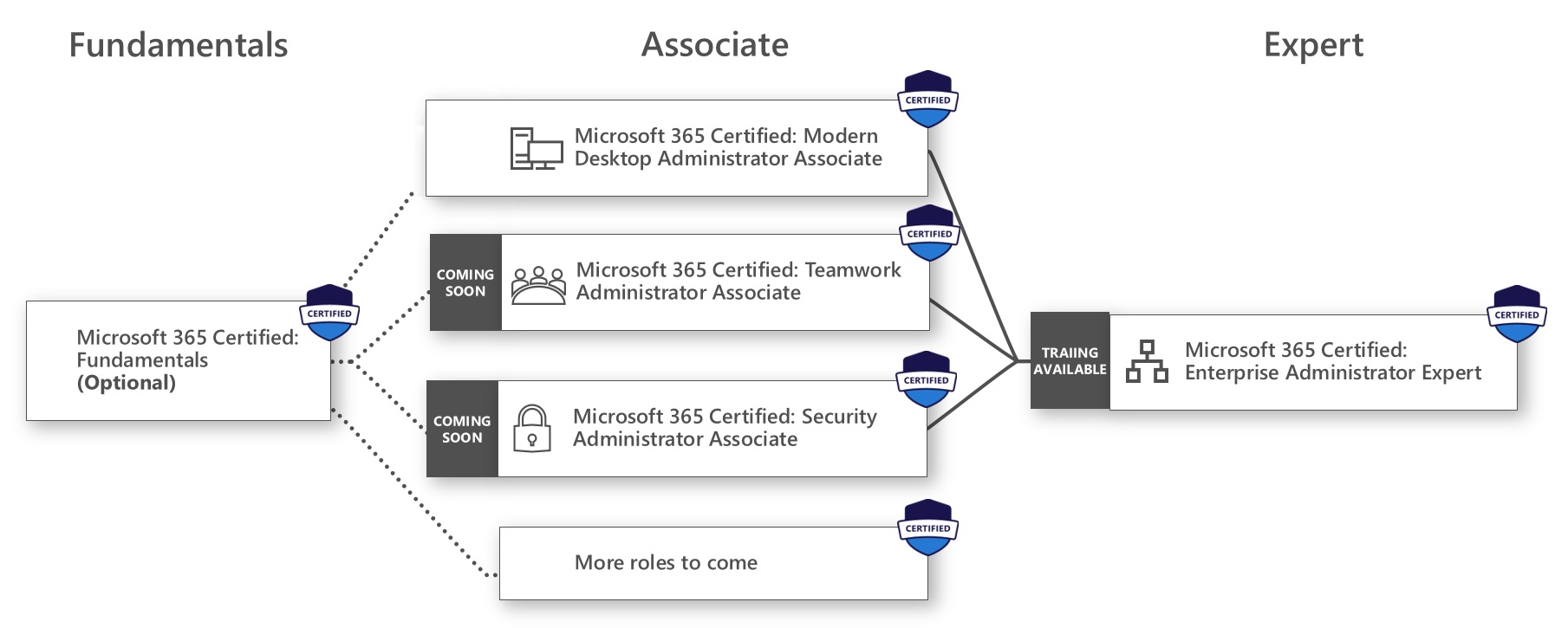
Microsoft 365 Roadmap
What You'll Learn
In this course, you will learn how to:
- Gain comprehensive skills to manage Microsoft 365 identities, services, and workloads
- Learn to implement and manage identity synchronization using Entra Connect
- Strengthen your security and compliance posture with Microsoft Defender and Purview
- Master administration of Exchange Online, Teams, and SharePoint Online
Course Outline
Configure your Microsoft 365 experience
- Explore your Microsoft 365 cloud environment
- Configure your Microsoft 365 organizational profile
- Manage your tenant subscriptions in Microsoft 365
- Integrate Microsoft 365 with customer engagement apps
- Configure tenant-level sharing settings for SharePoint and OneDrive
- Configure tenant-level settings for Microsoft Teams
- Enable Unified Audit Logging in Microsoft 365
- Complete your tenant configuration in Microsoft 365
Manage users, licenses, guests, and contacts in Microsoft 365
- Determine the user identity model for your organization
- Create user accounts in Microsoft 365
- Manage user account settings in Microsoft 365
- Manage user licenses in Microsoft 365
- Recover deleted user accounts in Microsoft 365
- Perform bulk user maintenance in Microsoft Entra ID
- Create and manage guest users using B2B collaboration
- Collaborate with guests in a SharePoint site
- Create and manage contacts
Manage groups in Microsoft 365
- Examine groups in Microsoft 365
- Create and manage groups in Microsoft 365
- Create dynamic groups using Microsoft Entra rule builder
- Create a Microsoft 365 group naming policy
- Create groups in Exchange Online and SharePoint Online
Add a custom domain in Microsoft 365
- Plan a custom domain for your Microsoft 365 deployment
- Plan the DNS zones for a custom domain
- Plan the DNS record requirements for a custom domain
- Create a custom domain in Microsoft 365
Configure client connectivity to Microsoft 365
- Examine how automatic client configuration works
- Explore the DNS records required for client configuration
- Configure Outlook clients
- Troubleshoot client connectivity
Configure administrative roles in Microsoft 365
- Explore the Microsoft 365 permission model
- Explore the Microsoft 365 admin roles
- Assign admin roles to users in Microsoft 365
- Delegate admin roles to partners
- Manage permissions using administrative units in Microsoft Entra ID
- Elevate privileges using Microsoft Entra Privileged Identity Management
- Examine best practices when configuring administrative roles
Manage tenant health and services in Microsoft 365
- Monitor the health of your Microsoft 365 services
- Monitor tenant health using Microsoft 365 Adoption Score
- Monitor tenant health using Microsoft 365 usage analytics
- Implement Microsoft 365 Network Connectivity Assessments and Insights
- Implement Microsoft 365 Backup (Preview)
- Develop an incident response plan
- Request assistance from Microsoft
Deploy Microsoft 365 Apps for enterprise
- Explore Microsoft 365 Apps for enterprise functionality
- Complete a self-service installation of Microsoft 365 Apps for enterprise
- Deploy Microsoft 365 Apps for enterprise with Microsoft Configuration Manager
- Deploy Microsoft 365 Apps for enterprise from the cloud
- Deploy Microsoft 365 Apps for enterprise from a local source
- Manage updates to Microsoft 365 Apps for enterprise
- Explore the update channels for Microsoft 365 Apps for enterprise
- Manage your cloud apps using the Microsoft 365 Apps admin center
Analyze your Microsoft 365 workplace data using Microsoft Viva Insights
- Examine the analytical features of Microsoft Viva Insights
- Explore Personal insights
- Explore Team insights
- Explore Organization insights
- Explore Advanced insights
Explore identity synchronization
- Examine identity models for Microsoft 365
- Examine authentication options for the hybrid identity model
- Explore directory synchronization
Prepare for identity synchronization to Microsoft 365
- Plan your Microsoft Entra ID deployment
- Prepare for directory synchronization
- Choose your directory synchronization tool
- Plan directory synchronization using Microsoft Entra Connect Sync
- Plan for directory synchronization using Microsoft Entra Cloud Sync
1100 XP Implement directory synchronization tools
- Configure Microsoft Entra Connect Sync prerequisites
- Configure Microsoft Entra Connect Sync
- Monitor synchronization services using Microsoft Entra Connect Health
- Configure Microsoft Entra Cloud Sync prerequisites
- Configure Microsoft Entra Cloud Sync
Manage synchronized identities
- Manage users with directory synchronization
- Manage groups with directory synchronization
- Maintain directory synchronization using Microsoft Entra Connect Sync security groups
- Configure object filters for directory synchronization
- Explore Microsoft Identity Manager
- Troubleshoot directory synchronization
Manage secure user access in Microsoft 365
- Examine the identity and access tools used in Microsoft 365
- Manage user passwords
- Implement Conditional Access policies
- Enable pass-through authentication
- Implement multifactor authentication
- Explore passwordless authentication options
- Explore self-service password management
- Implement Microsoft Entra Smart Lockout
- Explore Security Defaults in Microsoft Entra ID
- Investigate authentication issues using sign-in logs
Examine threat vectors and data breaches
- Explore today’s work and threat landscape
- Examine how phishing retrieves sensitive information
- Examine how spoofing deceives users and compromises data security
- Compare spam and malware
- Examine account breaches
- Examine elevation of privilege attacks
- Examine how data exfiltration moves data out of your tenant
- Examine how attackers delete data from your tenant
- Examine how data spillage exposes data outside your tenant
- Examine other types of attacks
Explore the Zero Trust security model
- Examine the principles and components of the Zero Trust model
- Plan for a Zero Trust security model in your organization
- Examine Microsoft’s strategy for Zero Trust networking
- Adopt a Zero Trust approach
Manage secure user access in Microsoft 365
- Examine the identity and access tools used in Microsoft 365
- Manage user passwords
- Implement Conditional Access policies
- Enable pass-through authentication
- Implement multifactor authentication
- Explore passwordless authentication options
- Explore self-service password management
- Implement Microsoft Entra Smart Lockout
- Explore Security Defaults in Microsoft Entra ID
- Investigate authentication issues using sign-in logs
Explore security solutions in Microsoft Defender XDR
- Enhance Exchange Online Protection with Microsoft Defender for Office 365
- Protect your organization’s identities using Microsoft Defender for Identity
- Protect your enterprise network against advanced threats using Microsoft Defender for Endpoint
- Protect against cyber attacks using Microsoft 365 Threat Intelligence
- Provide insight into suspicious activity using Microsoft Defender for Cloud App Security
- Review the security reports in Microsoft Defender XDR
Examine Microsoft Secure Score
- Explore Microsoft Secure Score
- Assess your security posture with Microsoft Secure Score
- Improve your secure score
- Track your Microsoft Secure Score history and meet your goals
Examine Privileged Identity Management in Microsoft Entra ID
- Explore Privileged Identity Management in Microsoft Entra ID
- Configure Privileged Identity Management
- Audit Privileged Identity Management
Examine Microsoft Entra ID Protection
- Explore Microsoft Entra ID Protection
- Enable the default protection policies in Microsoft Entra ID Protection
- Explore the vulnerabilities and risk events detected by Microsoft Entra ID Protection
- Plan your identity investigation
Enhance your email protection using Microsoft Defender for Office 365
- Climb the security ladder from EOP to Microsoft Defender for Office 365
- Expand EOP protections by using Safe Attachments and Safe Links
- Manage spoofed intelligence
- Configure outbound spam filtering policies
- Manage email access in Microsoft 365
- Submit messages, URLs, files, and attachments to Microsoft for analysis
Manage Safe Attachments
- Protect users from malicious attachments by using Safe Attachments
- Create Safe Attachment policies using Microsoft Defender for Office 365
- Create Safe Attachments policies using PowerShell
- Modify an existing Safe Attachments policy
- Create a transport rule to bypass a Safe Attachments policy
- Examine the end-user experience with Safe Attachments
Manage Safe Links
- Protect users from malicious URLs by using Safe Links
- Create Safe Links policies using Microsoft 365 Defender
- Create Safe Links policies using PowerShell
- Modify an existing Safe Links policy
- Create a transport rule to bypass a Safe Links policy
- Examine the end-user experience with Safe Links
Explore threat intelligence in Microsoft Defender XDR
- Explore Microsoft Intelligent Security Graph
- Explore alert policies in Microsoft 365
- Run automated investigations and responses
- Explore threat hunting with Microsoft Threat Protection
- Explore advanced threat hunting in Microsoft Defender XDR
- Explore threat analytics in Microsoft 365
- Identify threat issues using Microsoft Defender reports
Implement app protection by using Microsoft Defender for Cloud Apps
- Explore Microsoft Defender Cloud Apps
- Deploy Microsoft Defender for Cloud Apps
- Configure file policies in Microsoft Defender for Cloud Apps
- Manage and respond to alerts in Microsoft Defender for Cloud Apps
- Configure Cloud Discovery in Microsoft Defender for Cloud Apps
- Troubleshoot Cloud Discovery in Microsoft Defender for Cloud Apps
Implement endpoint protection by using Microsoft Defender for Endpoint
- Explore Microsoft Defender for Endpoint
- Configure Microsoft Defender for Endpoint in Microsoft Intune
- Onboard devices in Microsoft Defender for Endpoint
- Manage endpoint vulnerabilities with Microsoft Defender Vulnerability Management
- Manage device discovery and vulnerability assessment
- Reduce your threat and vulnerability exposure
Implement threat protection by using Microsoft Defender for Office 365
- Explore the Microsoft Defender for Office 365 protection stack
- Examine the security policies and rules used in Microsoft Defender for Office 365
- Investigate security attacks by using Threat Explorer
- Identify cybersecurity issues by using Threat Trackers
- Prepare for attacks with Attack simulation training
Examine data governance solutions in Microsoft Purview
- Explore data governance and compliance in Microsoft Purview9 min
- Protect sensitive data with Microsoft Purview Information Protection7 min
- Govern organizational data using Microsoft Purview Data Lifecycle Management
- Minimize internal risks with Microsoft Purview Insider Risk Management
- Explore Microsoft Purview eDiscovery solution
Explore data management practices in Microsoft 365
- Explore archive mailboxes in Microsoft 365
- Enable archive mailboxes in Microsoft 365
- Restore deleted data in Exchange Online
- Restore deleted data in SharePoint Online
Explore retention in Microsoft 365
- Explore retention by using retention policies and retention labels
- Compare capabilities in retention policies and retention labels
- Define the scope of a retention policy
- Examine the principles of retention
- Implement retention using retention policies, retention labels, and eDiscovery holds
- Restrict retention changes by using Preservation Lock
Explore compliance in Microsoft 365
- Plan for security and compliance in Microsoft 365
- Plan your beginning compliance tasks in Microsoft Purview
- Manage your compliance requirements with Compliance Manager
- Examine the Compliance Manager dashboard
- Analyze the Microsoft Compliance score
Implement Microsoft Purview Insider Risk Management
- Explore insider risk management
- Plan for insider risk management
- Explore insider risk management policies
- Create insider risk management policies
- Investigate insider risk management activities and alerts
- Explore insider risk management cases
Implement Microsoft Purview Information Barriers
- Explore Microsoft Purview Information Barriers
- Configure information barriers in Microsoft Purview
- Examine information barriers in Microsoft Teams
- Examine information barriers in OneDrive
- Examine information barriers in SharePoint
Explore Microsoft Purview Data Loss Prevention
- Examine data loss prevention for workloads
- Examine DLP policies
- Explore Endpoint data loss prevention
- Explore adaptive protection in Microsoft Purview
- View DLP policy results
Implement Microsoft Purview Data Loss Prevention
- Plan to implement Microsoft Purview Data Loss Protection
- Implement Microsoft Purview’s default DLP policies
- Design a custom DLP policy
- Create a custom DLP policy from a template
- Configure email notifications for DLP policies
- Configure policy tips for DLP policies
Implement data classification of sensitive information
- Explore data classification
- Implement data classification in Microsoft 365
- Explore trainable classifiers
- Create and retrain a trainable classified
- View sensitive data using Content explorer and Activity explorer
- Detect sensitive information documents using Document Fingerprinting
Explore sensitivity labels
- Manage data protection using sensitivity labels
- Explore what sensitivity labels can do
- Determine a sensitivity label’s scope
- Apply sensitivity labels automatically
- Explore sensitivity label policies
Implement sensitivity labels
- Plan your deployment strategy for sensitivity labels
- Enable sensitivity labels for files in SharePoint and OneDrive
- Examine the requirements to create a sensitivity label
- Create sensitivity labels
- Publish sensitivity labels
- Remove and delete sensitivity labels
Frequently Asked Questions
What is the Microsoft 365 Administrator Expert (MS-102) Boot Camp?
The MCE Microsoft 365 Administrator Expert (MS-102) Boot Camp is an intensive, instructor-led Microsoft 365 certification training program designed for IT professionals who manage, secure, and administer enterprise Microsoft 365 environments. The course focuses on Microsoft 365 tenant management, identity, security, compliance, and core Microsoft 365 services.
Who should take MS-102 Microsoft 365 Administrator training?
MS-102 training is ideal for Microsoft 365 administrators, cloud administrators, systems administrators, IT managers, Microsoft 365 engineers, security professionals, and experienced IT professionals responsible for managing Microsoft 365 environments.
Do I need previous Microsoft 365 experience to take MS-102 training?
Yes. MS-102 is an advanced Microsoft 365 administration course, so previous experience with Microsoft 365, Microsoft Entra ID, Windows, networking, security, or cloud administration is highly recommended.
What is Microsoft Entra ID and why is it covered in MS-102?
Microsoft Entra ID provides identity and access management capabilities for Microsoft cloud environments. MS-102 training covers identity and access concepts because managing users, groups, roles, authentication, permissions, and secure access is a fundamental part of administering Microsoft 365.
Does MS-102 training cover Microsoft 365 security?
Yes. Security is a major component of Microsoft 365 administration. Training can cover Microsoft Defender, security policies, identity protection, threat protection, access controls, data security, and other Microsoft 365 security capabilities.
Does the MS-102 Boot Camp cover Microsoft Purview?
Yes. Participants learn about Microsoft Purview and its role in Microsoft 365 compliance, data governance, information protection, and regulatory requirements. These capabilities help organizations protect and manage sensitive information across their Microsoft 365 environment.
Related products
-

MCA Microsoft 365 Endpoint Administrator Associate Certification (AB-900, MD-102) Boot Camp
$3,495.00 Course Details This product has multiple variants. The options may be chosen on the product page -
MCE Microsoft 365 Administrator Expert & MCA Microsoft 365 Endpoint Administrator Accelerated Certification Boot Camp
$4,995.00 Course Details This product has multiple variants. The options may be chosen on the product page -
MCA Microsoft Teams Administrator Certification (MS-700) Boot Camp
$2,495.00 Course Details This product has multiple variants. The options may be chosen on the product page -
MCE Cybersecurity Architect & MCA Microsoft Security Operations Certification (SC-100, SC-200) Boot Camp
$4,495.00 Course Details This product has multiple variants. The options may be chosen on the product page
Ready to Take the Next Step?
Choose your upcoming training date or talk with our training advisors about the right option for you or your team.