
Microsoft 365 Endpoint & AI Services Administrator · MD-102 + AB-650
Pass the Microsoft 365 Endpoint & AI Services Administrator Certification in Just 6 Days
Live instructor-led training, official courseware, hands-on labs, exam vouchers, and a free retake — all in one package.
What's Included
Microsoft Certified Trainer (MCT) Instructor Led Live Training
Microsoft Official Courses (MD-102 & AB-650)
Microsoft Official Exam Vouchers (MD-102 & AB-650)
Free Retake Voucher for Each Exam
Microsoft Official Hands On Labs
Microsoft Vetted Practice Exam
Onsite & Online Pearson Vue Testing
Upcoming Sessions
Microsoft 365 Endpoint & AI Services Administrator Associate Certification (MD-102, AB-650) Boot Camp
Scroll to see additional dates.
Date
Location / Format
Price
Nov 16–20, 2026
Sarasota, FL · Onsite
$3,495.00
Dec 7–11, 2026
Sarasota, FL · Onsite
$3,495.00
Jan 11–15, 2027
Sarasota, FL · Onsite
$3,495.00
Feb 8–12, 2027
Sarasota, FL · Onsite
$3,495.00
Mar 8–12, 2027
Sarasota, FL · Onsite
$3,495.00
Apr 12–16, 2027
Sarasota, FL · Onsite
$3,495.00
May 10–14, 2027
Sarasota, FL · Onsite
$3,495.00
Training a team? Get a customized Team Quote
Volume pricing available for groups and corporate training.
Upcoming Sessions
Microsoft 365 Endpoint & AI Services Administrator
Course Details
Microsoft 365 Endpoint & AI Services Administrator Associate Certification (MD-102, AB-650) Boot Camp
Duration
6 Days
Exams Covered
MD-102 / AB-650
Delivery
Classroom Live
Remote Live
Remote Live
Included
Vouchers + Retake + Official Labs
Why Thousands Choose Career Camps
17+ Years of Training Experience
For more than 17 years, professionals and organizations have relied on our training expertise to build in-demand technology skills, prepare for industry certifications, and advance their teams.
5,000+ Professionals Trained
With 5,000+ professionals trained, we bring extensive experience supporting individuals, enterprise teams, government organizations, and military clients with technology skills and certification training.
Trusted by Professionals & Organizations
Trusted by thousands of IT professionals, businesses, government organizations, and enterprise teams for high-quality certification training and technology skills development.
Access to 10+ Training Providers
Get access to training from 10+ established certification training providers, giving you more options to find the right course, schedule, delivery format, and training solution for your certification goals.
Live Certified Instructors
Learn directly from experienced certified instructors—not prerecorded videos or self-paced material.
Official Training
Train with authorized, official courseware and curriculum from leading technology certification providers. Get the same industry-recognized training designed to prepare professionals for today’s most in-demand certifications and technology roles.
Course Description
- Description
- Prerequisites
- Our Facilities
- Why Choose Us
- Microsoft Gold Learning Partner
- What You'll Learn
Description
Prerequisites
There are no formal prerequisites required to take the Microsoft AB-650 exam. However, Microsoft recommends that candidates have experience working with Microsoft 365 workloads and Microsoft Entra ID, an understanding of Microsoft Defender XDR, and familiarity with Microsoft Graph PowerShell. A working knowledge of Microsoft 365 administration, security, identity, and compliance is recommended for success in this course and exam.
For the MD-102 certification, students should have knowledge of the following:
Experience with Microsoft Entra ID, Microsoft 365, and Microsoft Intune
Experience deploying, configuring, and maintaining Windows client devices
Familiarity with managing non-Windows devices
An understanding of networking, client security, identity, access, applications, and device management concepts
Our Facilities
CAREER CAMPS FACILITIES
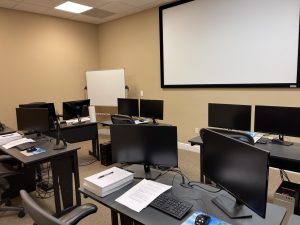 CAMPUS – Career Camps built out a stand alone training center (not a hotel conference room) with spacious classrooms, new desk, Herman Miller Aeron chairs & comfortable common areas. Each student has a dedicated desk with two monitors. Each classroom has a maximum of two rows – so everyone is able to be engaged without the “back row” feeling.
CLASSROOM EQUIPMENT – Students work on a dedicated Dell Client Desktop with 32GB memory with 512GB SSD drives – All Labs are executed the extremely fast Microsoft Data Center Hosted Lab Environment.
CAMPUS INTERNET – The campus is connected with a 1Gbps (1,000 Mbps) Verizon Fios Business Connection which provides complete internet (including VPN) access for students.
COMMON AREA – Amenities including snacks, drinks (Coffee, 100% juices, sodas, etc) all complimentary.
LODGING – We use the Hyatt Place Lakewood Ranch. This “upgraded” hotel offers extremely comfortable beds, great breakfast and very fast internet access.
NEAR BY AMENITIES – Many shops, restaurants and grocery options are available within walking distance. Additionally – the hotel provided scheduled shuttle services. Restaurants like Bone Fish Grill, Ruby Tuesday’s, Five Guys, Chipotle, Quiznos, Chili’s and over 20 additional choices in the immediate area. All of these options are offered in a pedestrian walking village.
Why Choose Us
CAREER CAMPS DIFFERENCE
Career Camps provides an in-depth hands on learning environment. Our instructors teach using demonstrations and explain concepts beyond the scope of the courseware. The best instructors are contracted from all across the US. These professionals are real world consultants who actually implement these technologies. Career Camps knows our clients work in the “real world” and it only makes sense to have an instructor with the experience in the real world.
 Facilities – Many of our competitors over-crowd classrooms by placing 2 to 3 students per desk and 20+ students per instructor. Often these companies “extend” the life of very old equipment with slow performance on the software used today. Our average class size is 8 students. Our facilities have the best equipment with the most comfortable, focused environment for learning.
Instructors – Our CEO, Chester Flake holds one of the rarest Microsoft Certifications – the Microsoft Certified Learning Consultant (MCLC) Certification. This certification reflects a commitment to make sure our instructors are also actively engaged in real world consulting projects. Students expect a professional who can answer questions and demonstrate the technology.
Face to Face Training – We believe the best way to interact and learn is face to face training. Many of our competitors which offer local training are simply providing students with headphones/mic to attend class with an instructor at a remote location.
Test Pass – We offer a free retake voucher (if needed) for each of the exams required for certification. Any training center offering a “100% pass guarantee” would have to use unethical practices or unlimited test vouchers (which is not likely or practical).
Distractions – Students often look for a “local” training center so they can be close to home and work. Boot camp requires a tremendous time commitment during the program. Long class hours combined with self study each evening. The goal of boot camp is to achieve certification in a fraction of the time. We strongly recommend students attend camp away from home and work in a focused, distraction free environment.
Boot Camp – Boot camp is an accelerated training focused on teaching technology and testing students on the official exams. Most training providers “added” boot camps to the existing standard training classes they offer. These training centers think a boot camp is just a regular class where you send the student home with a voucher on the last day. Career Camps administers exams throughout the camp. Equally important – not every trainer can teach a boot camp and not all courseware is designed for boot camp format. Our trainers know the boot camp format and our courseware is designed for accelerated learning.
Florida – Career Camps has one of the most scenic locations boasting some of the best weather in US. We believe students should have a comfortable and inviting atmosphere while attending these otherwise intense programs. We place our location, facilities and amenities up against that any competitor.
Microsoft Gold Learning Partner

What You'll Learn
Learn how to manage modern Microsoft 365 environments while supporting the secure adoption of AI across an organization. Training focuses on:
- Microsoft 365 tenant and workload administration
- Microsoft Entra ID, identities, roles, authentication, and Conditional Access
- Microsoft 365 security and compliance
- Microsoft Defender for Office 365
- Microsoft Purview, data protection, DLP, and information governance
- Microsoft 365 Copilot administration and readiness
- Microsoft 365 Copilot Search, settings, connectors, and user experiences
- Microsoft Agent 365 and AI agent administration
- Agent identities, access, lifecycle management, monitoring, and governance
- AI service security, data protection, and compliance
- Microsoft Graph PowerShell and enterprise administration
- AI service costs, usage, adoption, and monitoring
- Introduction to Microsoft 365 core services and admin controls
- Explore Microsoft 365 security foundations
- Protect and govern Microsoft 365 data
- Explore Microsoft 365 Copilot and agents
- Perform basic administrative tasks for Microsoft 365 Copilot & Agents
- Deploy Windows client
- Manage identity and compliance
- Manage, maintain, and protect devices
- Manage applications
Course Outline
Module 1: Configure and Manage Microsoft 365 Tenants & Workloads
- Configure and manage Microsoft 365 tenants
- Manage Microsoft 365 users, groups, licenses, and administrative roles
- Configure Microsoft 365 organizational settings
- Manage Microsoft 365 workloads and services
- Configure Microsoft 365 applications and services
- Manage Microsoft 365 service health and reporting
- Use Microsoft Graph PowerShell for Microsoft 365 administration
- Configure Microsoft 365 connectivity and administration tools
Module 2: Govern & Secure Microsoft 365
- Configure Microsoft Entra ID and identity management
- Manage authentication and access controls
- Configure Conditional Access policies
- Manage administrative roles and permissions
- Implement Microsoft 365 security controls
- Configure Microsoft Defender capabilities
- Protect organizational data with Microsoft Purview
- Implement data loss prevention (DLP)
- Manage information protection and compliance
- Configure retention and governance policies
- Protect sensitive information and organizational data
- Monitor security, compliance, and governance activity
Module 3: Administer Microsoft 365 Copilot
- Configure Microsoft 365 Copilot
- Prepare an organization for Copilot adoption
- Manage Copilot licensing and access
- Configure Copilot settings and controls
- Manage Copilot data access and permissions
- Monitor Copilot usage and adoption
- Use the Copilot Control System
- Monitor Copilot service health and performance
Module 4: Manage Microsoft 365 AI Services & Agents
- Configure and manage AI services in Microsoft 365
- Administer Microsoft 365 agents
- Manage agent identities and access
- Configure agent security and permissions
- Manage agent lifecycle and governance
- Monitor agent activity using Agent 365
- Protect sensitive data accessed by agents
- Evaluate compliance and security risks associated with agents
- Support secure collaboration between users and AI agents
Module 5: Secure Microsoft 365 AI Services
- Protect AI services and Microsoft 365 data
- Apply identity and access controls to AI services
- Configure security and compliance protections
- Manage data access for Copilot and agents
- Implement governance controls for AI workloads
- Protect sensitive and regulated information
- Monitor AI-related security and compliance activity
Module 6: Monitor & Optimize Microsoft 365 and AI Services
- Monitor Microsoft 365 service health
- Monitor Copilot usage and adoption
- Analyze workload-level adoption data
- Monitor AI service usage
- Manage AI service costs
- Use the Copilot Control System for monitoring
- Monitor agent activity and performance
- Optimize Microsoft 365 and AI services for enterprise environments
- AB-650 Exam Preparation
- Review the AB-650 exam objectives
- Microsoft 365 administration scenarios
- Security and compliance scenarios
- Microsoft 365 Copilot administration scenarios
- AI services and agent management scenarios
- Practice questions and exam strategies
- Final exam readiness review
Explore Endpoint Management
- Explore the concepts, technologies, and lifecycle processes used to manage enterprise endpoints across different operating systems, platforms, and device types.
- Explore modern endpoint management
- Examine the enterprise desktop lifecycle
- Compare Windows editions and capabilities
- Explore Windows installation and deployment methods
- Identify endpoint management planning considerations
- Explore Microsoft Intune as a unified endpoint management platform
- Manage Microsoft Entra Identities
Prepare the identity infrastructure required to manage users, groups, devices, roles, and access within a Microsoft 365 environment.
- Explore Microsoft Entra ID
- Compare Microsoft Entra ID with Active Directory Domain Services
- Create and manage users and groups
- Configure administrative roles and role-based access control
- Manage device identities in Microsoft Entra ID
- Configure hybrid identity synchronization
- Manage identities by using PowerShell
- Prepare Microsoft Intune for Device Management
Configure the Microsoft Intune tenant, administrative controls, device platforms, and enrollment settings required to manage organizational endpoints.
- Configure the Microsoft Intune tenant
- Configure supported device platforms
- Manage Intune roles and scope tags
- Configure enrollment restrictions
- Configure device categories and corporate identifiers
- Implement multi-admin approval
- Monitor Intune tenant and service health
- Enroll Devices in Microsoft Intune
Implement enrollment methods for Windows, Apple, and Android devices and manage devices throughout the enrollment lifecycle.
- Configure automatic enrollment for Windows devices
- Enroll Windows devices in Microsoft Intune
- Configure Windows enrollment options
- Enroll macOS, iOS, and iPadOS devices
- Configure Apple automated device enrollment
- Configure Android Enterprise enrollment
- Manage personally owned and corporate-owned devices
- Troubleshoot device enrollment
- Configure Device Profiles
Create and manage configuration profiles, security settings, and policies that control the behavior of managed devices.
- Create device configuration profiles
- Configure settings catalog policies
- Configure administrative templates
- Manage Windows device settings
- Configure Apple and Android device settings
- Configure shared and specialized devices
- Manage local users and groups
- Monitor configuration profile deployment
- Manage Authentication, Access, and Compliance
Implement authentication, compliance, and access controls that protect organizational resources and support secure device access.
- Configure device compliance policies
- Configure compliance notifications and actions
- Integrate device compliance with Conditional Access
- Configure multifactor authentication
- Implement Windows Hello for Business
- Configure passwordless authentication
- Implement Windows Local Administrator Password Solution
- Monitor and troubleshoot device compliance
- Deploy Windows Devices
Plan and implement modern Windows deployment and provisioning solutions using Microsoft Intune and Windows Autopilot.
- Plan Windows deployment strategies
- Configure Windows Autopilot deployment profiles
- Configure the Enrollment Status Page
- Deploy devices with Windows Autopilot
- Implement self-deploying and pre-provisioned deployment
- Manage Windows edition upgrades
- Configure Windows activation
- Implement Windows Backup and Restore
- Troubleshoot Windows deployment
- Manage Device Updates
Plan, deploy, and monitor operating system and feature updates across managed endpoint platforms.
- Plan an endpoint update strategy
- Configure Windows update rings
- Deploy Windows feature and quality updates
- Configure driver and firmware updates
- Implement Windows Autopatch
- Configure Windows Hotpatch
- Manage Apple and Android operating system updates
- Configure Delivery Optimization
- Monitor and troubleshoot update deployment
- Deploy and Manage Applications
Prepare, deploy, configure, update, and monitor applications across Windows, Apple, and Android devices.
- Prepare applications for deployment
- Deploy Win32 applications
- Deploy line-of-business applications
- Deploy Microsoft Store applications
- Deploy Microsoft 365 Apps
- Configure application requirements and dependencies
- Configure application supersedence
- Manage Apple and Android applications
- Monitor and troubleshoot application deployment
- Protect Applications and Organizational Data
Use application protection and configuration policies to protect organizational information on managed and unmanaged devices.
- Configure application protection policies
- Protect data on personally owned devices
- Configure application configuration policies
- Implement data transfer and access restrictions
- Configure Conditional Access for protected applications
- Manage mobile application management without enrollment
- Monitor application protection status
- Troubleshoot application protection policies
- Manage Endpoint Security
Configure Microsoft Intune and Microsoft Defender for Endpoint controls to secure devices, applications, identities, and organizational data.
- Configure endpoint security policies
- Manage Microsoft Defender Antivirus
- Configure Microsoft Defender Firewall
- Manage disk encryption and BitLocker
- Configure attack surface reduction policies
- Implement security baselines
- Configure App Control for Business
- Integrate Intune with Microsoft Defender for Endpoint
- Onboard devices to Microsoft Defender for Endpoint
- Monitor endpoint security and remediation status
- Perform Remote Device Management
Manage, troubleshoot, secure, and retire enrolled devices using remote actions and diagnostic tools.
- Perform remote device actions
- Restart, rename, sync, and locate devices
- Retire, wipe, and delete devices
- Reset device passcodes
- Collect device diagnostics
- Review device logs and management status
- Perform bulk device actions
- Troubleshoot managed devices
- Implement Microsoft Intune Suite Capabilities
Use advanced Microsoft Intune Suite capabilities to enhance endpoint security, application delivery, support, connectivity, and certificate management.
- Explore Microsoft Intune Suite capabilities
- Configure Endpoint Privilege Management
- Deploy applications from the Enterprise App Catalog
- Implement Microsoft Intune Remote Help
- Configure Microsoft Cloud PKI
- Implement Microsoft Tunnel
- -Explore Advanced Analytics
- Evaluate Intune Suite licensing and deployment considerations
- Manage Cloud-Based Desktops
Plan, deploy, configure, and manage cloud-hosted desktops using Windows 365 and Azure Virtual Desktop.
- Explore Windows 365 capabilities
- Plan Windows 365 Cloud PC deployment
- Configure provisioning policies
- Manage Cloud PC images and network connections
- Monitor and troubleshoot Cloud PCs
- Explore Azure Virtual Desktop
- Manage Azure Virtual Desktop endpoints
- Secure access to cloud-hosted desktops
- Automate Endpoint Management
Use PowerShell and Microsoft Graph to automate administrative tasks, retrieve endpoint data, and manage Intune resources at scale.
- Explore endpoint management automation
- Manage Microsoft Intune with PowerShell
- Connect to Microsoft Graph
- Use Microsoft Graph PowerShell
- Retrieve device, user, policy, and application information
- Automate repetitive endpoint management tasks
- Manage resources through Microsoft Graph
- Apply permissions and security considerations to automation
- Use Microsoft Security Copilot for Endpoint Management
Use Microsoft Security Copilot to investigate endpoint issues, analyze security information, summarize findings, and support administrative decision-making.
- Explore Microsoft Security Copilot capabilities
- Use natural language prompts for endpoint administration
- Investigate device and security issues
- Analyze endpoint security data
- Summarize incidents and recommendations
- Use Security Copilot with Microsoft Intune
- Use Security Copilot with Microsoft Defender for Endpoint
- Review AI-generated results before taking action
- Monitor and Optimize Endpoint Operations
Monitor endpoint health, performance, compliance, security, and user experience using Intune reporting and analytics capabilities.
- Monitor device health and compliance
- Create and review Intune reports
- Use Endpoint Analytics
- Analyze startup performance and application reliability
- Use proactive remediations
- Create remediation scripts
- Monitor policy and application deployment
- Review operational dashboards and alerts
- Troubleshoot endpoint management issues
Frequently Asked Questions
What is the Microsoft 365 Endpoint & AI Services Administrator Boot Camp?
This 6-day instructor-led boot camp combines preparation for MD-102: Endpoint Administrator and AB-650: Administering Microsoft 365 and AI Services. The training covers modern endpoint management, Microsoft Intune, Windows deployment, Microsoft 365 administration, security, Microsoft 365 Copilot, AI services, and enterprise AI agents.
What certifications can I earn with this boot camp?
The boot camp prepares you for two Microsoft certifications: Microsoft 365 Certified: Endpoint Administrator Associate, associated with MD-102, and Microsoft 365 Certified: AI Services Administrator Associate, associated with AB-650. Each certification has its own Microsoft exam.
Are MD-102 and AB-650 separate exams?
Yes. MD-102 and AB-650 are separate Microsoft exams, and each certification has its own exam requirement. This boot camp combines preparation for both exams into one accelerated training program.
Who should take this Microsoft 365 Endpoint and AI Services Boot Camp?
This training is ideal for Microsoft 365 administrators, endpoint administrators, systems administrators, IT professionals, cloud administrators, security professionals, Microsoft Intune administrators, and IT teams responsible for managing devices, Microsoft 365 environments, and emerging AI services.
Why combine MD-102 and AB-650 into one boot camp?
Modern IT administrators increasingly manage both end-user devices and cloud-based Microsoft 365 services, while also supporting the adoption of AI tools such as Copilot and enterprise AI agents. Combining MD-102 and AB-650 provides a broader skill set covering endpoint management, Microsoft 365 administration, security, governance, and AI services in one accelerated training program.
How can these Microsoft certifications benefit my career?
MD-102 and AB-650 validate skills that are increasingly relevant to modern IT environments, including endpoint management, Microsoft Intune, Microsoft 365 administration, identity, security, Copilot, AI services, and AI agent governance. Together, they demonstrate a broader ability to manage Microsoft's modern workplace and emerging AI-powered technologies.
Related products
-


MCA AI Services Administrator Associate Certification (AB-650) Boot Camp
$3,495.00 Course Details This product has multiple variants. The options may be chosen on the product page -
MCA Microsoft Teams Administrator Certification (MS-700) Boot Camp
$2,495.00 Course Details This product has multiple variants. The options may be chosen on the product page -
MCE Microsoft 365 Administrator Expert & MCA Microsoft 365 Endpoint Administrator Accelerated Certification Boot Camp
$4,995.00 Course Details This product has multiple variants. The options may be chosen on the product page -
MCA Microsoft 365 Endpoint Administrator Associate Certification (AB-900, MD-102) Boot Camp
$3,495.00 Course Details This product has multiple variants. The options may be chosen on the product page


Ready to Take the Next Step?
Choose your upcoming training date or talk with our training advisors about the right option for you or your team.